
Lighting
Types of lighting:
Types of lights:
ideally all lights should be baked and no real-time lights should be used!!
Real-time lights in VRChat will usually either look terrible, tank your framerate, or usually both.
So how do you light dynamic objects? Light probes. These probes pre-calculate how an object would be lit at that probes location. Many of these probes are placed in a group, and when dynamic objects move through this group they blend the probes and are lit accordingly.
Add a light probe group to your scene. Place probes around every point there is a lighting change. Spawn a new gameobject like a capsule and drag it around to see how it takes on the lighting from the probes.
Reflection probes
Used for reflections. They act as a camera, taking 6 pictures from where they are placed (the 6 directions) and combining that data into a cubemap (a spherical image). Overlapping reflection probes blend.
DO NOT use screen space reflections in VR. They are incredibly taxing on performance!
Reflection Probe Guide[gitlab.com]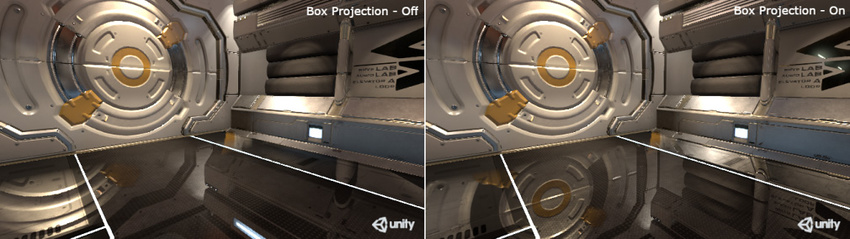
Lighting settings
Go to Window>Rendering>Lighting Settings to bring up the window.
If it is an outdoor scene, turn skybox lighting on and set the directional light source in the lighting settings.
Texels per unit
Texels are like pixels placed onto an object, and used to calculate the baked lighting. For many PC worlds I find ~30 texels per unit to be a sufficient compromise between quality and size.
Have your lights set to cast soft shadows.
To actually see how the lightmap texels will be projected onto your geometry, you can click the dropdown at the top of the Scene window (the one that is usually set to "Shaded") and set it to "Baked Lightmap".
To change the lightmap UVs of your mesh, you can do so in the model settings (click on the model in the Project window and change the Generate Lightmap UVs settings at the bottom of the Model tab).
While some objects with short shadows may be more accurately lit with hard shadows, soft shadows are more accurate across longer distances and look better at lower texel resolutions. Unity doesn’t include adaptive shadows out of the box like PCSS (Percentage Closeness Soft Shadows).
Next time you go in the sunlight, look at your shadow. Look at how the edges are sharp close to the origin (your feet) and get blurrier as you go up! That’s what techniques like PCSS emulate.
Do not overuse texels! The more texels you have, the larger in file size your lightmap(s) will be!
https://unity3d.com/how-to/progressive-lightmapper-optimization-tips
There are some situations where you would want to have a higher texel count because of overlapping lightmapping UVs (common with probuilder objects). UV overlap[docs.unity3d.com]
In your level design, avoid putting detailed shadows on the floor or low on the walls if your lighting is baked; the non-static models walking on top of those shadows won’t have those detailed shadows projected onto them.
Lightmap resolution
Controls the maximum resolution of the lightmap(s). Set it so that you only have one lightmap for optimal performance.
Bounces
Controls how many bounces a light ray will perform. [These take a long time to bake]Most
How many light bounces your scene will "need" depends on what type of scene it is, how many lights there are, how bright (or dim) it is, and how many shaded crevices need to be filled in with global illumination.
Bakery Lightmapper
Link to Bakery on the Unity Asset Store
A very powerful (paid) alternative to Unity's built-in progressive lightmapper. Very highly recommended after you've made a couple worlds and are serious about making more with even better lighting. Watch this video for details.
Read the manual to learn how to use it.
You need moreto put a Bakery light component on all the lights in your scene that you want baked.
The real time preview is also very highly recommended as it allows you to preview your changes in real time (rather than 2.having [Exceptionsto wouldwait minutes to see each change). This time savings not only speeds up your creation, it allows you to be more creative and experimental, and try things you otherwise wouldn't have.
Note that this add-on will only work with NVidia graphics cards.
Light Volumes

This is a package by RED_SIM that essentially acts as 3D lightmaps. It is extra work to set up but is feasible for small to medium sized scenes (or small sections of larger worlds).
This is NOT a light probe replacement! Only objects with light volume compatible shaders will be lit entirelyby indirectly.]light volumes! Light probes are still needed in your scene (and light volumes includes a tool to make them easier to set up too)!
Bakery is NOT a requirement to use light volumes. They can be baked with Unity's built-in lightmapper.
OcclusionCombining Culling[docs.unity3d.com]real-time and baked lighting
SetReal yourtime staticlights GameObjectsdo not calculate indirect lighting in Unity by default. Sometimes, environments can be so big that baking all of the direct shadows (like from a directional light) is not feasible. In this case, it can be acceptable to have a directional light which casts realtime shadows. In addition, the indirect lighting, aka global illumination or GI, can be baked. This will result in sharp shadows across the landscape and beautiful baked lighting in the places that need it.
To do this, set the directional light from Baked to Mixed. This combines realtime shadows with baked GI.
Make sure to do all the other steps like setting baked objects to static [this(at willleast set"contribute the sub-parameters, occlusion and occludee static to true]GI"). Then go to Windows>Rendering>Occlusion Culling, and hit bake before uploading your world.
UnityAdjusting won’tper-object rendertexel avatars the player can’t see; since rendering avatarsdensity is whatvery tanksimportant! performanceEspecially thefor most,this gooduse VRChat level design should subconsciously guide the player to look only at the other players they are interacting with, without rendering a bunch of poorly performing avatarscase in the background that they don’t care about.particular!