# How to join VRCLibrary

## Creating an account

<p class="callout danger">**VRCLibrary is deprecated. You cannot create new accounts.**</p>

**VRCLibrary is open for anyone to read, even without an account.**

By creating an account, you get access to:

- **Submitting your own books** - Share your knowledge! *Keep reading to learn how.*
- **Comments** - Share your thoughts, give feedback, join discussions.
- **Favorites**, **Recents**, **Profile page**, and more.

[![image-1643803438617.png](https://vrclibrary.com/wiki/uploads/images/gallery/2022-02/scaled-1680-/image-1643803438617.png)](https://vrclibrary.com/wiki/register "https://vrclibrary.com/wiki/register")

<details id="bkmrk-notes-when-signing-i"><summary>Notes</summary>

- When signing in via Email, make sure to check your spam folder to confirm your account!
- You can also use Discord to register.
- By registering, you agree to our [Terms of Use](https://vrclibrary.com/wiki/books/vrcwiki-rules-guides-and-tutorials/page/terms-of-use) and [Privacy Policy](https://www.gdprprivacynotice.com/live.php?token=t1OpN4QdydlqZaslRNRODrbArIsYkXf5).
</details>## Adding your own book

Adding your own book is easy! Here's how to get started.

1. **Create an account** to get started.
2. **Create a book** by going to 'Books' and selecting 'Create new Book'. 
    - Give your book a nice name, thumbnail, and [some tags](https://vrclibrary.com/wiki/books/rules-content-guidelines/page/how-to-tag-your-content) (optional)
3. **Add pages** to your book to fill it with content.  
    
    - You're looking at a page right now! Pages can contain text, images, videos and more.
    - You can also create chapters to organize your pages.
    - If each page of your book covers very different topics, [consider tagging them](https://vrclibrary.com/wiki/books/rules-content-guidelines/page/how-to-tag-your-content)!
4. The **'Books' tab** will contain your book, for everyone to see.  
    
    - Collaborators can add your Book to a **Shelf** to make it even easier to find.
5. **Check the [style guide](https://vrclibrary.com/wiki/books/wiki-guides-rules-and-tutorials/page/book-style-guide)** if you're unsure of how you should write your pages.

You did it! 🥳 If your book is of high quality, an admin may add it to the curated [community shelf.](https://vrclibrary.com/wiki/shelves/community-books)

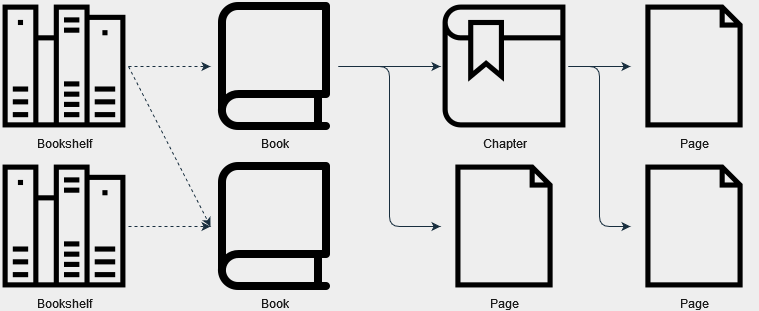
Before you go, here's a quick reminder of how BookStack (the wiki platform we use) is structured:

- **Shelves** contain books. 
    - Only admins can manage shelves
    - Books do not need to be on a shelf. They can also be on multiple shelves.
- **Books** are created by users. 
    - Only the user who created a book can manage it.
- **Pages** are contained in books. Pages can be organized into **Chapters.**

<div drawio-diagram="91"><img src="https://vrclibrary.com/wiki/uploads/images/drawio/2022-01/drawing-3-1643542214.png" alt=""/></div>

One more thing: Each Bookshelf, Book, Chapter, and Page can also have **Tags**. Visitors can click on a tag to see other content with that tag! [Read our guide on how to tag your content.](https://vrclibrary.com/wiki/books/rules-content-guidelines/page/how-to-tag-your-content)