# Custom Editor Menu Items

How to create different types of menu items for the Unity Editor.

<details id="bkmrk-custom-toolbar-menu-"><summary>Custom Toolbar Menu</summary>

This is how you can make a custom toolbar menu for pointing into any static method.

[![image.png](https://vrclibrary.com/wiki/uploads/images/gallery/2022-12/scaled-1680-/image.png)](https://vrclibrary.com/wiki/uploads/images/gallery/2022-12/image.png)

```c#
namespace Varneon.VUdon.VehiclesLite.Editor
{
    public class CarSetupWizard : EditorWindow
    {
    	// Every forward slash marks a new submenu
        [MenuItem("Varneon/VUdon - Vehicles/Lite/Car Setup Wizard")]
        private static void OpenWindow()
        {
            GetWindow<CarSetupWizard>("Car Setup Wizard");
        }
	}
}
```

</details><details id="bkmrk-component-context-me"><summary>Component Context Menu</summary>

This is how you can make context menu items for different types of components in the inspector.

[![image.png](https://vrclibrary.com/wiki/uploads/images/gallery/2022-12/scaled-1680-/Js6image.png)](https://vrclibrary.com/wiki/uploads/images/gallery/2022-12/Js6image.png)
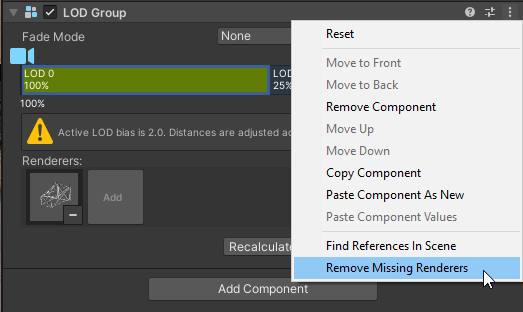
```c#
using System.Linq;
using UnityEditor;
using UnityEngine;

namespace Varneon.EditorUtilities.ComponentExtensions
{
    /// <summary>
    /// Collection of context menu actions for LODGroups
    /// </summary>
    public static class LODGroupContextMenuActions
    {
        /// <summary>
        /// Validate the method for removing missing renderer references from LODGroup
        /// </summary>
        /// <param name="command"></param>
        [MenuItem("CONTEXT/LODGroup/Remove Missing Renderers", validate = true)]
        private static bool ValidateRemoveMissingRenderers(MenuCommand command)
        {
            LODGroup lodGroup = (LODGroup)command.context;

            // Check if any of the renderer references is null
            return lodGroup.GetLODs().SelectMany(l => l.renderers).Any(r => r == null);
        }

        /// <summary>
        /// Remove missing renderer references from LODGroup
        /// </summary>
        /// <param name="command"></param>
        [MenuItem("CONTEXT/LODGroup/Remove Missing Renderers")]
        private static void RemoveMissingRenderers(MenuCommand command)
        {
            LODGroup lodGroup = (LODGroup)command.context;

            Undo.RecordObject(lodGroup, "Remove missing LODGroup renderers");

            lodGroup.SetLODs(lodGroup.GetLODs().Select(l => new LOD(l.screenRelativeTransitionHeight, l.renderers.Where(r => r != null).ToArray())).ToArray());
        }
    }
}
```

</details><details id="bkmrk-hierarchy-menu-this-"><summary>Hierarchy Menu</summary>

This is how you can make menu items for the hierarchy window.

[![image.png](https://vrclibrary.com/wiki/uploads/images/gallery/2022-12/scaled-1680-/HJtimage.png)](https://vrclibrary.com/wiki/uploads/images/gallery/2022-12/HJtimage.png)

```c#
using UnityEditor;
using UnityEngine;

namespace Varneon.EditorUtilities.HierarchyActions
{
    /// <summary>
    /// Collection of hierarchy context menu actions for creating proxy objects
    /// </summary>
    public static class ProxyObjectActions
    {
        /// <summary>
        /// Creates a new proxy parent object for the selected object(s)
        /// </summary>
        /// <param name="command"></param>
        [MenuItem("GameObject/Create Parent Proxy", false, 0)]
        private static void CreateProxyParent(MenuCommand command)
        {
            // Get the selected object's transform
            Transform contextTransform = ((GameObject)command.context).transform;

            // Create a new object
            Transform newProxyTransform = new GameObject(string.Format("{0}_Proxy", contextTransform.name)).transform;

            // Match the parent
            newProxyTransform.SetParent(contextTransform.parent, false);

            // Match the sibling index
            newProxyTransform.SetSiblingIndex(contextTransform.GetSiblingIndex());

            // Register undo for the new proxy
            Undo.RegisterCreatedObjectUndo(newProxyTransform.gameObject, "Create proxy parent");

            // Parent the original object to the new proxy with undo
            Undo.SetTransformParent(contextTransform, newProxyTransform, "Parent object to proxy");
        }
    }
}

```

</details>