Varneon's UdonSharp Development Practices
In-depth look into my personal development practices, UdonSharp prefab standards, performance and security recommendations and much more.
Fundamentals
Basic information that everyone should be aware of when developing with UdonSharp
Access Modifiers
What Are Access Modifiers?
All types and type members in C# have an accessibility level and access modifiers are for controlling where they can be used from.
|
Caller's location |
public | protected internal | protected | internal | private protected | private |
| Within the class | ✔️️ | ✔️️ | ✔️️ | ✔️️ | ✔️️ | ✔️️ |
| Derived class (same assembly) | ✔️️ | ✔️️ | ✔️️ | ✔️️ | ✔️️ | ❌ |
| Non-derived class (same assembly) | ✔️️ | ✔️️ | ❌ | ✔️️ | ❌ | ❌ |
| Derived class (diff. assembly) | ✔️️ | ✔️️ | ✔️️ | ❌ | ❌ | ❌ |
| Non-derived class (diff. assembly) | ✔️️ | ❌ | ❌ | ❌ | ❌ | ❌ |
What Access Modifiers Should I Use?
UdonSharp 1.x supports all access modifiers for the source C# scripts to allow for better design of larger frameworks, so we can use them all just like we would with native C#.
Rule of thumb: Keep the access modifiers as strict as possible.
Common Mistakes
Creators who may be new to C# development standards often expose everything in their classes by leaving fields and methods on public, which in case of prefab distribution can lead to confusion.
Example 1 - Fields | Public vs Private + [SerializeField]
Simply setting the access modifier of a field to public is the easiest way of making it accessible in the Unity Editor, but it also exposes it in other scripts, which may be unwanted behavior.
We can change the access modifier of the field to private and add an attribute, [SerializeField]. This will result in identical behavior on the inspector, but limits the scope of the field to that class only.
public bool publicField;

[SerializeField]
private bool privateSerializedField;Attributes
What are attributes?
Attributes are "markers" or "tags" for associating metadata with code in a declarative way. They can be used to tell the Unity Editor, C# compiler, or even our own scripts how to treat certain classes, fields, methods, and so on.
https://docs.unity3d.com/Manual/Attributes.html
Attributes are declared right before their target and are always wrapped in brackets:
using JetBrains.Annotations;
using System.Runtime.CompilerServices;
using UdonSharp;
using UnityEngine;
using UnityEngine.Serialization;
using Varneon.VUdon.Editors;
using Varneon.VUdon.Noclip.Abstract;
using Varneon.VUdon.Noclip.Enums;
using VRC.SDKBase;
using VRC.Udon.Common;

[assembly: InternalsVisibleTo("Varneon.VUdon.Noclip.Editor")]

namespace Varneon.VUdon.Noclip
{
    [SelectionBase]
    [DefaultExecutionOrder(-1000000000)]
    [AddComponentMenu("VUdon/Noclip")]
    [DisallowMultipleComponent]
    [HelpURL("https://github.com/Varneon/VUdon-Noclip/wiki/Settings")]
    [UdonBehaviourSyncMode(BehaviourSyncMode.None)]
    public partial class Noclip : UdonSharpBehaviour
    {
        [FoldoutHeader("Options", "Options that can be edited before build and in-game")]
        [SerializeField]
        [Tooltip("Method for triggering the noclip mode")]
        private NoclipTriggerMethod noclipTriggerMethod = NoclipTriggerMethod.DoubleJump;

        [SerializeField]
        [FieldLabel("Toggle Threshold (s)")]
        [Tooltip("Time in which jump has to be double tapped in order to toggle noclip")]
        [FieldRange(0.1f, 1f)]
        private float toggleThreshold = 0.25f;

        [SerializeField]
        [FieldLabel("Speed (m/s)")]
        [Tooltip("Maximum speed in m/s")]
        [Min(1f)]
        [FormerlySerializedAs("velocity")]
        private float speed = 15f;

        [PublicAPI("Sets noclip enabled")]
        public void _SetNoclipEnabled(bool enabled)
        {
            SetNoclipEnabled(enabled);
        }

#if UNITY_EDITOR && !COMPILER_UDONSHARP
        [UsedImplicitly]
        [UnityEditor.Callbacks.PostProcessScene(-1)]
        private static void InitializeOnBuild() { }
#endif
    }
}
What attributes should I know about?
There are several quality of life attributes that everyone should know and use, and here are most of them:
Field Attributes
These attributes can be used on fields, primarily to alter their appearance in the inspector.
| [Range] | Restrict a float or int variable to a specific range |
| [Min] | Restrict a float or int variable to a specific minimum value |
| [Header] | Add a space and a header above a field in inspector |
| [TextArea] | Make string field height-flexible and scrollable |
| [ColorUsage] | Configure Color field to support HDR and/or alpha |
| [GradientUsage] | Configure Gradient field's color space and HDR |
| [Space] | Add a space above a field in inspector |
| [SerializeField] | Force Unity to serialize a private field |
| [HideInInspector] | Hide a variable from the inspector |
| [Tooltip] | Display a text in inspector when hovering over a field |
| [NonSerialized] | Prevent variable from being serialized (also hides from inspector) |
| [NonReorderable] | Disable default reorderability in new array and list fields (Unity 2020.2+) |
| [FormerlySerializedAs] | Preserve original serialized value of a field when renaming it |
Class Attributes
These attributes can be used on classes.
| [UdonBehaviourSyncMode] | Enforce a synchronization mode of an UdonSharpBehaviour |
| [DefaultExecutionOrder] | Specify the execution order of update loops in relation to other UdonSharpBehaviours |
| [RequireComponent] | Add a component automatically to the same object and prevent its removal |
| [DisallowMultipleComponent] | Prevent multiple instances of the component from being added to the same object |
| [AddComponent] | Specify the path to this component in the "Add Component" menu |
| [ExcludeFromPreset] | Prevent creation of presets from instances of the class |
| [SelectionBase] | Mark the GameObject as a selection base object for Scene View picking |
| [Icon] | Specify an icon for a MonoBehaviour or ScriptableObject (Unity 2021.3+) |
Method Attributes
These attributes can be used on methods.
| [ContextMenu] | Add a command to the Component's context menu |
Common Attributes
| [Obsolete] | Mark an element to be no longer in use |
| [PublicAPI] | Mark publicly available API which should not be removed and treated as used |
| [UsedImplicitly] | Indicates that the marked symbol is used implicitly (e.g. via reflection, in external library) |
| [NotNull] | Indicates that the value of the marked element can never be null |
| [CanBeNull] | Indicates that the value of the marked element could be null sometimes |
Other Attributes
These attributes don't fall into the categories above, but are extremely useful and commonly used.
[InternalsVisibleTo]
This attribute allows you to make your Runtime assembly's internal members visible to the Editor assembly.
Example of this attribute being used: Udonity's AssemblyInfo.cs
- Create a new C# file called `AssemblyInfo.cs` into your Runtime folder
- Add the following content inside the file:
using System.Runtime.CompilerServices;
[assembly: InternalsVisibleTo("YOUR_EDITOR_ASSEMBLY_NAME_HERE")]
[CreateAssetMenu]
Mark a ScriptableObject-derived type to be automatically listed in the Assets/Create submenu.
Learn more about ScriptableObjects here.
// menuName: Path to the menu item
// fileName: Default name of the new file
// order: Priority of the menu item (100 is often reasonble)
[CreateAssetMenu(menuName = "VUdon - Vehicles/Data Presets/Car Spec Sheet", fileName = "NewCarSpecSheet.asset", order = 100)]
public class CarSpecSheet : ScriptableObject { }[InspectorName]
Use this attribute on enum value declarations to change the display name shown in the Inspector.
public enum ColorDisplayMode
{
    [InspectorName("RGB 0-255")]
    RGB255,

    [InspectorName("RGB 0-1.0")]
    RGB1,

    HSV
}Namespaces
What are namespaces?
Namespaces are a fundamental feature in C# and are used to control the scope of your projects.
When developing anything with UdonSharp, declaring your own namespaces should be one of the first steps of your development process.
If a creator doesn't declare their own namespace for their UdonSharpBehaviours, all of their classes will be exposed to the entire project by default and may cause misunderstandings and confusion, especially amongst beginners.
https://docs.microsoft.com/en-us/dotnet/csharp/fundamentals/types/namespaces
How to declare a namespace in UdonSharp?
In order to declare your own namespace for a project, all you have to do is encapsulate your class in curly brackets, lead by the namespace keyword and your desired namespace.
namespace Varneon.ExamplePrefab
{
	public class ExampleClass : UdonSharpBehaviour
    {

    }
}
It is highly recommended to always have the first element of the namespace be your own name (or brand, if you have one).
DO NOT use anyone else's name for the namespace unless you are working on the project for them!
How to access classes in other namespace?
In order to access classes in other namespaces, all you have to do is use the using keyword to extend the scope of your project to that other namespace
using Varneon.ExamplePrefab;

namespace Varneon.OtherExamplePrefab
{
	public class OtherExampleClass : UdonSharpBehaviour
    {
    	private ExampleClass exampleClass;
    }
}
Usage of namespaces makes it clear who is the developer of the project and makes it often easier to find specific project's scope 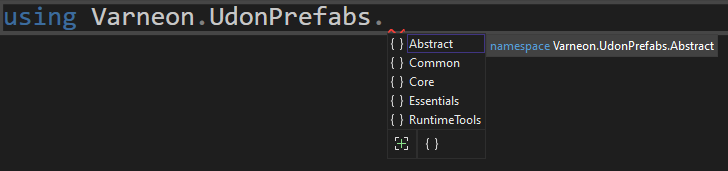
TLDR - Why use namespaces?
- Define clear scope for your project
- Prevent classes and enums from leaking to the default project scope
Assembly Definitions
Assembly Definitions can be overwhelming for beginners, but should be essential knowledge for developers of widely used prefabs made with UdonSharp.
I have just released a new Unity Editor extension for automating assembly definition generation: Experimental Automatic Assembly Definition Generator by Varneon | GitHub
What are assembly definitions?
Assembly Definitions and Assembly References are assets that you can create to organize your scripts into assemblies.
https://docs.unity3d.com/Manual/ScriptCompilationAssemblyDefinitionFiles.html
Why use assembly definitions?
Usage of assembly definitions promotes modularity and assists with declaring a clear scope for the dependencies
Assembly definitions support Define Constraints: only compile the assembly if specific Scripting Define Symbol is present (e.g. if you only want the assembly to compile if the symbol "UDONSHARP" is present, you can add it as a constraint)
How to use assembly definitions with U# 1.x?
U# requires a custom U# Assembly Definition to be present alongside with the main Assembly Definition when U# scripts are in said assembly
1) Create Assembly Definition
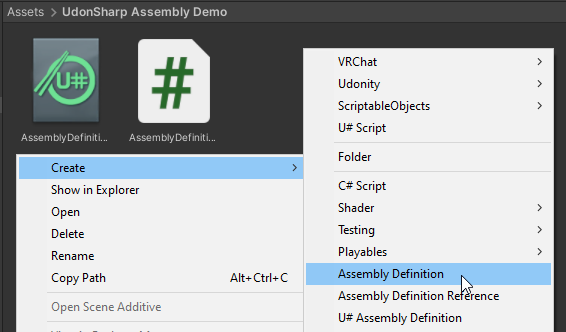
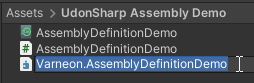
Name the Assembly Definition file clearly to indicate the developer and the project (Recommended to use similar format to namespaces)
Right after creating the assembly, you may notice errors appearing in your console, this is because the assemblies of the scripts that our scripts are referencing, aren't defined in the assembly definition

2) Define the assembly references
Adding UdonSharp.Runtime assembly as a reference allows us to reference the scripts contained in that assembly from our own scripts
If you need to access common VRChat's classes, such as VRCPickup or UdonBehaviour, other common assemblies to reference are VRC.Udon and VRC.SDK3
Disabling the option "Use GUIDs" is recommended, since the GUIDs may change over time
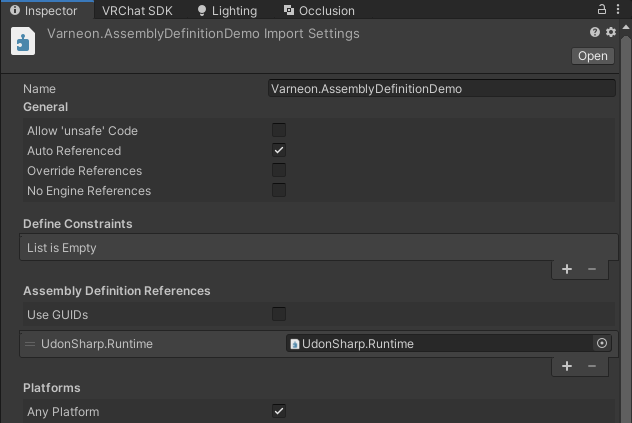
Right after clicking "Apply" on the assembly definition the scripts will attempt to compile, and you will most likely see the following error in the console. We will fix this next.

3) Create U# Assembly Definition
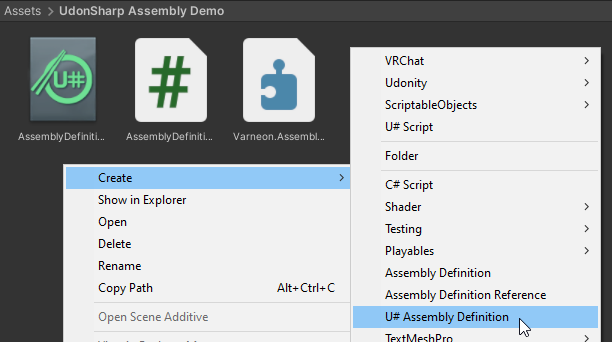
Make sure to name the U# Assembly Definition file identically to the main assembly definition's name!
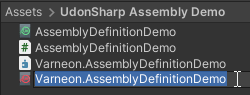
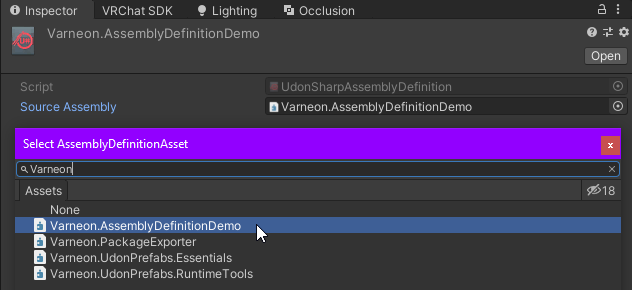
As the last step, assign the main assembly definition as the "Source Assembly" on the U# assembly definition
Now all of your UdonSharpBehaviours should compile successfully and you can continue the development
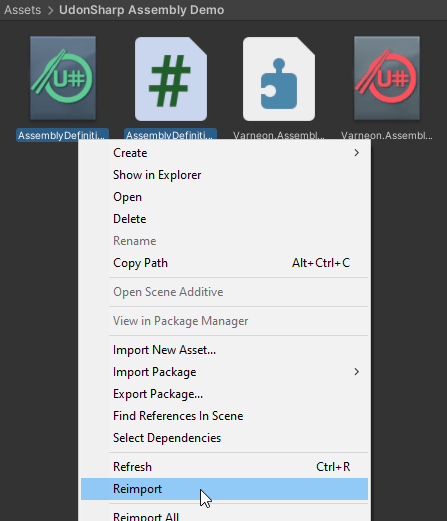
If UdonSharp still throws an error related to the scripts not being a part of a U# assembly, try reimporting the U# assets and scripts in the folder.
Optimization
Some good optimization measures to ensure that the UdonVM is not doing any unnecessary work in order to maintain a higher and more stable framerate
Patterns
How to implement certain design patterns from C# with U#
Observer Pattern
Since we don't have access to delegates, how can we effectively implement an observer pattern in UdonSharp?
I currently have 2 stable projects that have an observer pattern in them:
VUdon - EventDispatcher
VUdon - EventDispatcher
EventDispatcher is a "singleton" prefab for dispatching update events (FixedUpdate, Update, LateUpdate and PostLateUpdate).
You add and remove handlers (a.k.a. "subscribers") by calling the following public API methods:
[PublicAPI]
public void AddHandler(VRCUpdateEventType eventType, IUdonEventReceiver handler)
{
  switch (eventType)
  {
    case VRCUpdateEventType.FixedUpdate:
      AddFixedUpdateHandler(handler);
      break;
    case VRCUpdateEventType.Update:
      AddUpdateHandler(handler);
      break;
    case VRCUpdateEventType.LateUpdate:
      AddLateUpdateHandler(handler);
      break;
    case VRCUpdateEventType.PostLateUpdate:
      AddPostLateUpdateHandler(handler);
      break;
  }
}

[PublicAPI]
public void RemoveHandler(VRCUpdateEventType eventType, IUdonEventReceiver handler)
{
  switch (eventType)
  {
    case VRCUpdateEventType.FixedUpdate:
      RemoveFixedUpdateHandler(handler);
      break;
    case VRCUpdateEventType.Update:
      RemoveUpdateHandler(handler);
      break;
    case VRCUpdateEventType.LateUpdate:
      RemoveLateUpdateHandler(handler);
      break;
    case VRCUpdateEventType.PostLateUpdate:
      RemovePostLateUpdateHandler(handler);
      break;
  }
}
These methods will then call the methods for directly adding and removing the handler to and from the array:
[PublicAPI]
public void AddFixedUpdateHandler(IUdonEventReceiver handler)
{
  hasFixedUpdateHandlers = (fixedUpdateHandlerCount = (fixedUpdateHandlers = fixedUpdateHandlers.AddUnique(handler)).Length) > 0;
}

[PublicAPI]
public void RemoveFixedUpdateHandler(IUdonEventReceiver handler)
{
  if (fixedUpdateHandlerCount > 0) { hasFixedUpdateHandlers = (fixedUpdateHandlerCount = (fixedUpdateHandlers = fixedUpdateHandlers.Remove(handler)).Length) > 0; }
}
When a handler has been added, EventDispatcher will proceed to call the named methods on the handler behaviours:
private const string
	FixedUpdateHandlerName = "_FixedUpdateHandler",
	UpdateHandlerName = "_UpdateHandler",
	LateUpdateHandlerName = "_LateUpdateHandler",
	PostLateUpdateHandlerName = "_PostLateUpdateHandler";

private void FixedUpdate()
{
  if (hasFixedUpdateHandlers)
  {
    for (int i = 0; i < fixedUpdateHandlerCount; i++)
    {
      fixedUpdateHandlers[i].SendCustomEvent(FixedUpdateHandlerName);
    }
  }
}

private void Update()
{
  if (hasUpdateHandlers)
  {
    for (int i = 0; i < updateHandlerCount; i++)
    {
      updateHandlers[i].SendCustomEvent(UpdateHandlerName);
    }
  }
}

private void LateUpdate()
{
  if (hasLateUpdateHandlers)
  {
    for (int i = 0; i < lateUpdateHandlerCount; i++)
    {
      lateUpdateHandlers[i].SendCustomEvent(LateUpdateHandlerName);
    }
  }
}

public override void PostLateUpdate()
{
  if (hasPostLateUpdateHandlers)
  {
    for (int i = 0; i < postLateUpdateHandlerCount; i++)
    {
      postLateUpdateHandlers[i].SendCustomEvent(PostLateUpdateHandlerName);
    }
  }
}
Script references from: https://github.com/Varneon/VUdon-EventDispatcher/blob/main/Packages/com.varneon.vudon.event-dispatcher/Runtime/Udon%20Programs/EventDispatcher.cs
VUdon - Udonity
VUdon - Udonity
Udonity is a runtime replica of the Unity Editor for VRChat, and by its nature it requires an observer pattern to be in place for efficient runtime operation.
All fields within Udonity implement an observer pattern for receiving an event when the value of the field is changed by the user:
[SerializeField, HideInInspector]
private UdonSharpBehaviour valueChangedCallbackReceiver;

[SerializeField, HideInInspector]
private string valueChangedCallbackMethod;

[SerializeField, HideInInspector]
private int fieldId = -1;

public void RegisterValueChangedCallback(UdonSharpBehaviour callbackReceiver, string methodName)
{
  valueChangedCallbackReceiver = callbackReceiver;

  valueChangedCallbackMethod = methodName;
}

public void RegisterValueChangedCallback(UdonSharpBehaviour callbackReceiver, string methodName, int id)
{
  fieldId = id;

  RegisterValueChangedCallback(callbackReceiver, methodName);
}

public void OnValueChanged()
{
  if (valueChangedCallbackReceiver != null)
  {
    if(fieldId >= 0)
    {
      valueChangedCallbackReceiver.SetProgramVariable("activeFieldId", fieldId);
    }

    valueChangedCallbackReceiver.SendCustomEvent(valueChangedCallbackMethod);
  }
}
Script reference from: https://github.com/Varneon/VUdon-Udonity/blob/main/Packages/com.varneon.vudon.udonity/Runtime/Udon%20Programs/Fields/Abstract/Field.cs