# Constraints
After animator controllers, I’m very happy to talk about something simple. Constraints behave weirdly, but in a very predictable way.
Take the total amount of enabled constraints (type doesn’t matter) and use this graph to get the frame time. You can see that there are slow inclines, until a big jump. When VRChat was choosing their limits for constraints, they chose 681 to make sure you don’t have to take the penalty for that big jump, and I think that makes a lot of sense, since it goes from 1.7 ms to 2.4 ms (above the 0 point, which is 2 ms in this graph).
The jump alone there would take up 6% of your total frame budget for 90 fps, and that is without the performance cost of the constraints factored in.
[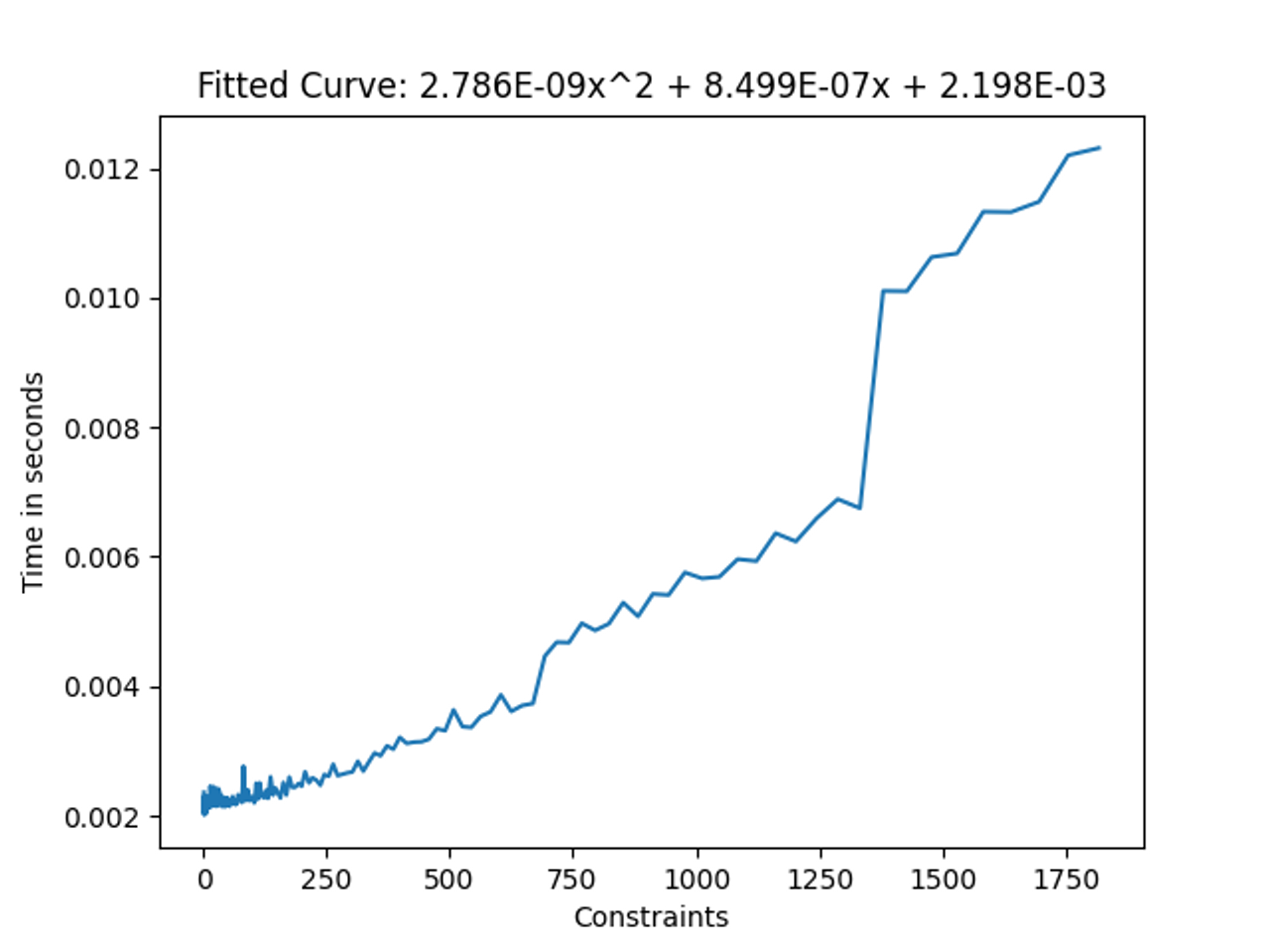](https://vrclibrary.com/wiki/uploads/images/gallery/2023-05/h1gimage.png)
Note: Disabled constraints do not count towards this total graph. Disabled here means either:
- GameObject is disabled
- Constraint component is disabled
- Constraint is set to “disabled”
However, setting the weight to 0 still makes it count for performance!