Animator Controllers
- Introduction
- Baseline: Two state toggle
- AnyState & Direct Blend Trees
- Miscellaneous
- Multiple Controllers
Introduction
To put the numbers in this section into perspective, I’d like to mention two points:
- Every test here is done without any state behaviours. Having one or more state behaviours on any layer of any controller increases the runtime of all controllers on that avatar by 50%. This happens regardless which state behaviour you are using, and since there are state behaviours on the default Action & Gesture layer, this cost is probably incurred on every single avatar that gets used. Because this cost is always there, I have chosen not to include it in any of my testing, since my tests are supposed to be comparative, but do note that if you’re looking at any of the raw numbers, you should probably add a 50% cost on top of it to get the actual numbers.
- Animator controllers don’t scale linearly. I will touch on this later, but having two avatars with 100 layers is not as laggy as having a single avatar with 200 layers. It is useful to optimize controllers, since less frametime is still a win, but if you get weird numbers (like the fact that if it scaled linearly, having 40 avatars with 50 layers would take 68 ms, but in reality it takes 6.4 ms)
I will first go over single controller frame time performance, and then I will go over how this scales with having multiple controllers.
Baseline: Two state toggle
For our baseline, we are going to look at the simple 2 state toggle.
 The default toggle we will be comparing against. Two animations, each with two frames, both with the same value. Write defaults on.
In every layer count test, the graph for layers vs frame time is quadratic. this means that the more layers you have, the worse adding an extra layer becomes. However, the quadratic term isn’t very strong, so for low layer counts, it can be approximated by a linear graph. For the basic toggle, this will be 0.01 ms per layer. This is our baseline to compare against.
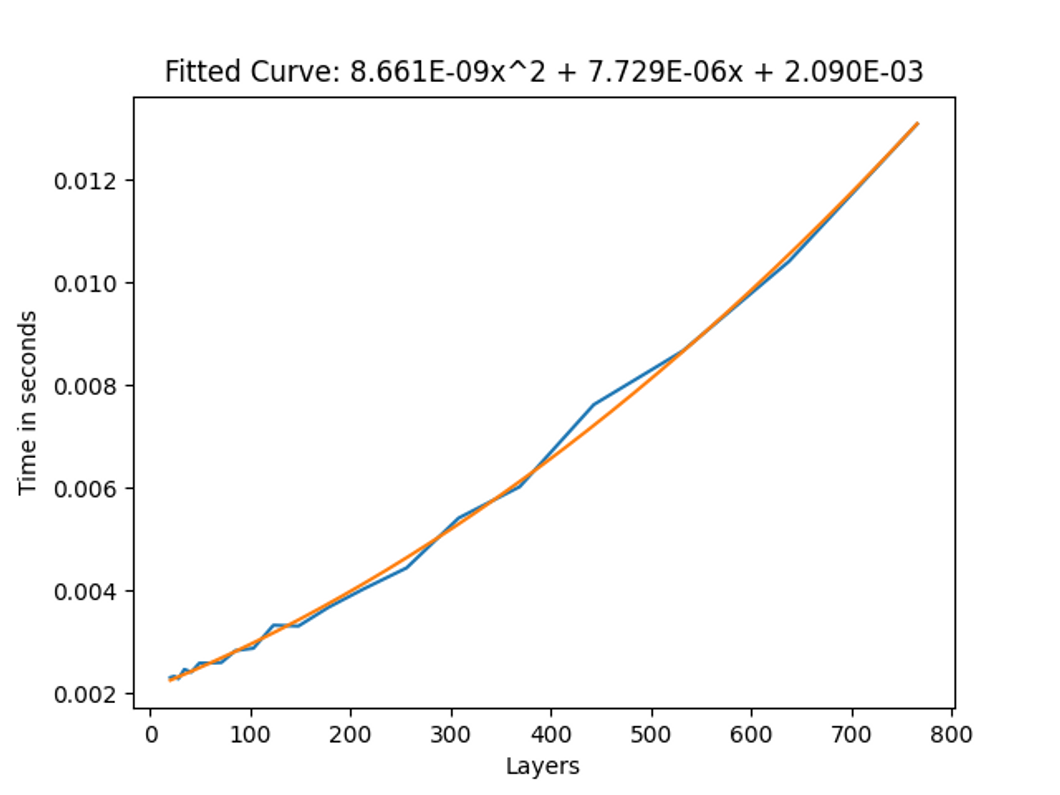 The frame time to layer count graph for the basic toggle without being actively toggled.
If we run this same benchmark again, but while actively animating the layers, we get the following graph.
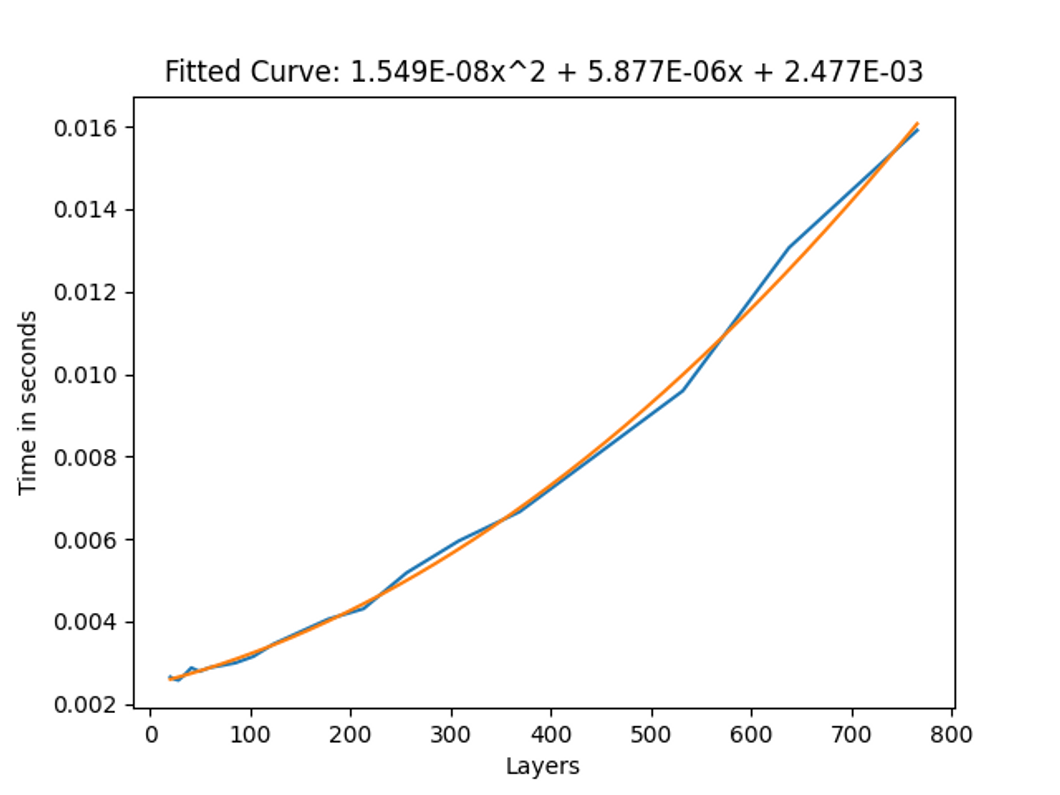 The frame time to layer count graph for the basic toggle while being actively toggled.
This graph shows us that there is an approximately 20-30% higher cost for toggles that are constantly toggled, compared to ones that aren’t. This would be the case for face/eye tracking for example. This 20-30% higher cost seems to be consistent with all my setups (AnyState, AnyState self transition, multiple animators, etc.), except for direct Blend Trees, where it depends on the setup.
AnyState & Direct Blend Trees
AnyState
AnyState seems to be similar in performance to non-AnyState toggles, no matter the amount of AnyState toggles. This indicates the amount of transitions checks is not a significant contributing factor to frame time, which is confirmed by other tests.
The only notable exception here is an AnyState toggle with “Can Transition to Self” active, as this does incur a 20% penalty over non-can-transition-to-self, even with the constant toggling comparison.
Direct Blend Trees
When the surprisingly large cost of layers was first discovered, people called for Direct Blend Trees as the one magical solution that would cut frame time by orders of magnitude. My results indicate that, while they don’t take zero time, they are an excellent tool in reducing frame time.
I have found two setups which are more performant than the normal layer toggles, one easier to work with, but slightly slower, and the other more difficult to set up, but slightly more performant.
For the slower setup I used a single Direct Blend Tree, with many 1D Blend Trees as children. All the children consistently had weight one, but the 1D Blend Tree blend value would be controlled for the toggles.
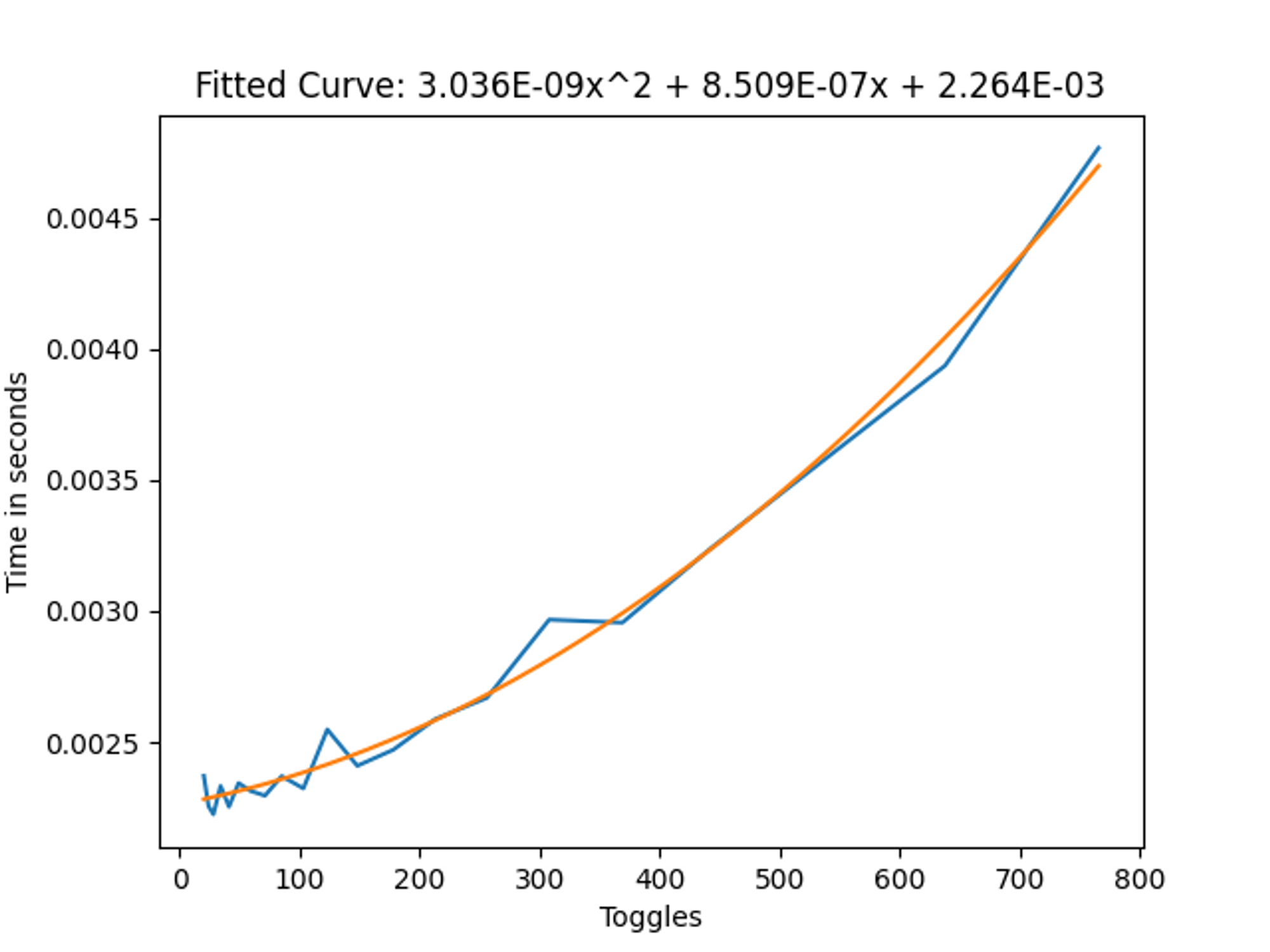 Direct Blend Tree frame time without the constant toggling
 Direct Blend Tree frame time with the constant toggling
From these results we can see that this cut our frame time by approximately 3/4ths, which is very good. Especially with large amounts of toggles, this can help a lot with performance.
To find out how to make one of these Blend Trees, I recommend reading the following article: Combining Layers Using Direct Blend Trees.
For the slightly faster setup, there are two layers required. The first layer is a single animation which animates the defaults of all the toggles. The second layer is a single Direct Blend Tree which uses the toggle parameters to toggle the state of the toggles with one animation per toggle.
So say for example I have a pair of shoes to toggle, and I want them on by default, then on the first layer in the big animation I’d animate the IsActive value to true, and on the second layer in the big Direct Blend Tree, I’d put an animation which animates the IsActive value to false, with the blend parameter being the parameter that I want to use. So when the parameter is 0, the animation weight is 0 and the default layer takes over, and when the parameter is 1 the animation is 1 and it overwrites the default layer.
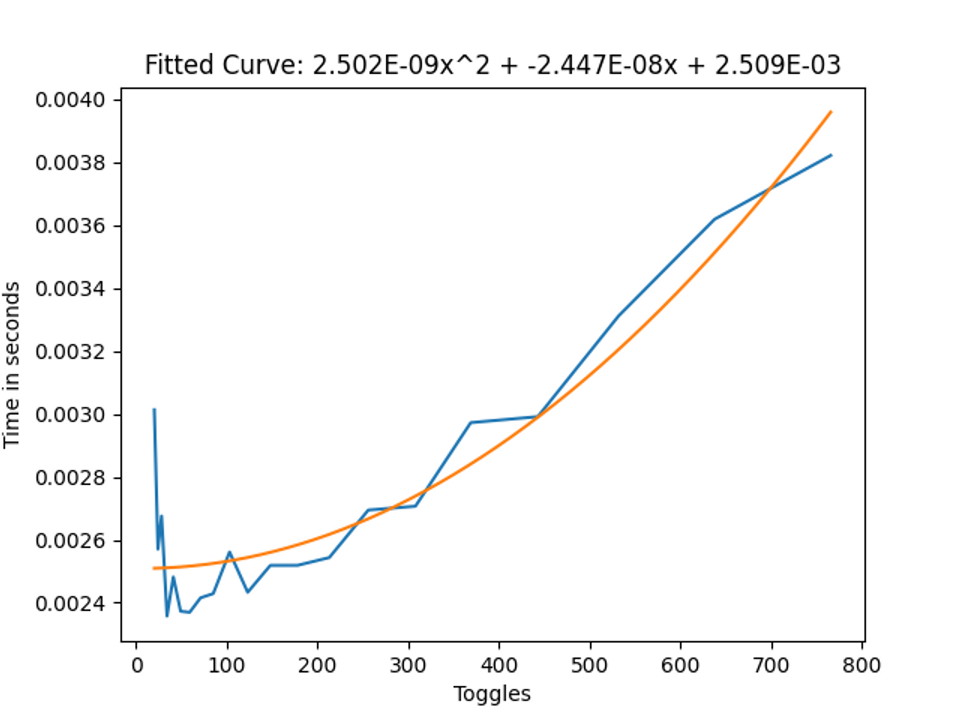 Direct Blend Tree frame time with default animation layer without constant toggling
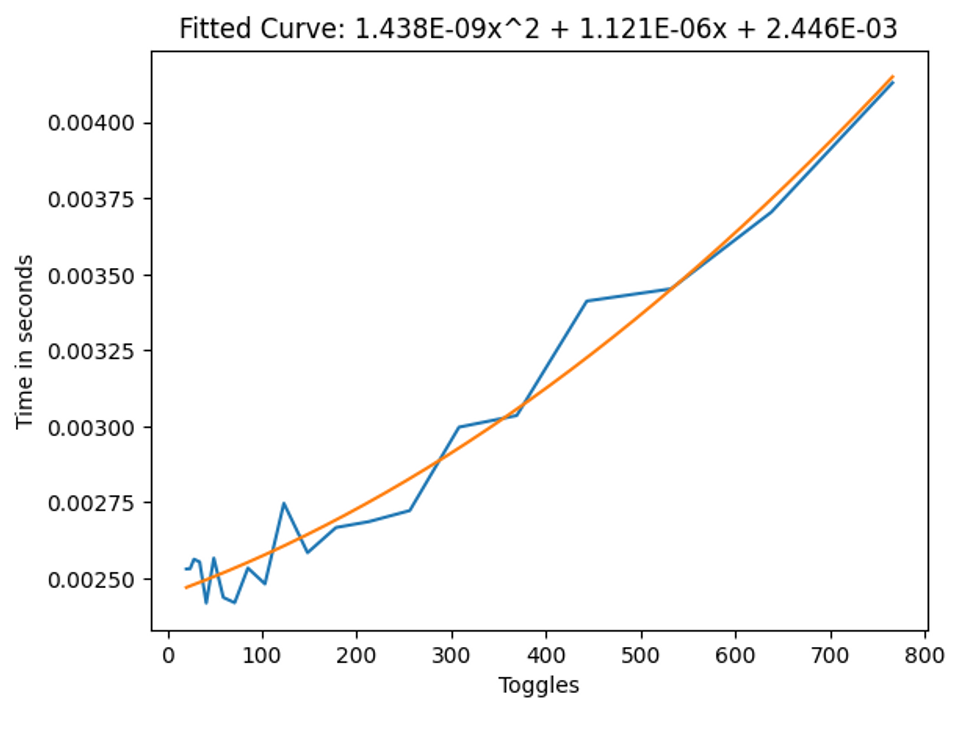 Direct Blend Tree frame time with default animation layer with constant toggling
From these results we can see that we cut or frame time by approximately 4/5ths over the simple two state toggles, and by 50% over the 1D Blend Tree setup in the active case, which is quite a big improvement, but how it works might be less clear and it can be more work to set up.
If you are constantly switching toggles (for example you’re building some face tracking setup or you’re using the voice parameter a lot), it might be an idea to use this, but otherwise, personally I’d stick with the two state setup.
Miscellaneous
Now for some miscellaneous data which doesn’t directly relate to toggles, but might be useful to someone:
- State count per layer and transition count don’t seem to matter much (which might be why AnyState is so cheap)
- The only time where this isn’t true is if there are many bool transitions out from a single state (many here meaning 1000 for 1 ms). Float/Int seems to not have this added overhead
- Using empty layers on humanoid rigs, using non-humanoid rigs and using no avatar all seem to cut frame time per layer by about 50% compared to the two state setup
- Masking seems to have little to no effect on frame time
- Using sub-state machines seems to have little to no effect on frame time
- Nesting blendtrees for clarity seems to have little to no effect on frame time
- For Direct Blend Trees, WD off seems to not change frame times by much
- For layer toggles, WD off seems to increase frame time by around 50%
- Parameters on the local avatar seem to cost 1.5 ms per 1000, but this cost doesn’t apply to remote avatars
Since face tracking takes up many layers, I wanted to do a comparison between a normal VRCFT controller, and a FX controller generated by Razgriz’s VRCFTGenerator (which packs the layers into Blend Trees).
I won’t bore you with the graphs, since they are just a straight line, but as for the data (this is with 37 face tracking parameters):
- VRCFT: 0.1733 ms per controller
- VRCFTGenerator: 0.066 ms per controller, a 62% decrease over the non Blend Tree version.
Multiple Controllers
Having multiple controllers does NOT scale linearly (that is, having 2 controllers with 100 layers causes way less lag than 1 controller with 200 layers).
The actual relationship is hard to describe, but here is a visual to maybe help with this. Where every line is a constant frame time. So for example 5 controllers with 580 layers are as laggy as 15 controllers with 300 layers.

I see two main takeaways from this graph:
- Big controllers cause a lot of frame time compared to many small ones. Optimization is especially necessary if you have many layers. (1 100 layer controller takes as much frame time as 10 30 layer controllers).
- Even with many controllers, if you halve the layer count on all of them, your total frame time still goes down by 50%. So if everyone optimized their layer count/layer setup, this would increase performance for everyone.
This relation seems the same for all controller types/layer configurations.