This is still just the raw structure of the steps involved! Images and more details will be added soon.
- Create a UI canvas - Right-click on your hierarchy, click on "UI > Canvas" - Switch **Render Mode** on **Canvas** to **World Space** - Reset the Canvas' **Rect Transform** - Set the **Width** and **Height** of the **Rect Transform** to 1000 - Set the **Scale** of the **Rect Transform** to 0.001 - Add **VRCUiShape** to the same GameObject as **Canvas** - Change the GameObject's layer to **Default** - Add a Panel - Right-click on the Canvas in your hierarchy, click on "UI > Panel" - Disable **Raycast Target** and **Maskable** toggles on the **Image** component ### 1) Create a UI CanvasCanvas is the root component of every UI
By default the render mode of the canvas will be set to ***"Screen Space - Overlay"***, meaning that the canvas will always overlay the game view. For a world space canvas we want to switch the mode to ***"World Space"***.
***"Screen Space - Overlay"*** and ***"Screen Space - Camera"*** are not compatible with VR as a render mode for a HUD
- Change **Render Mode** of the **Canvas** to ***"World Space"*** [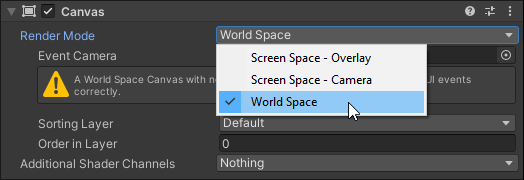](https://vrclibrary.com/wiki/uploads/images/gallery/2022-07/image-1657476687430.png)