Example of the DeepL translation tool with the Chrome plug-in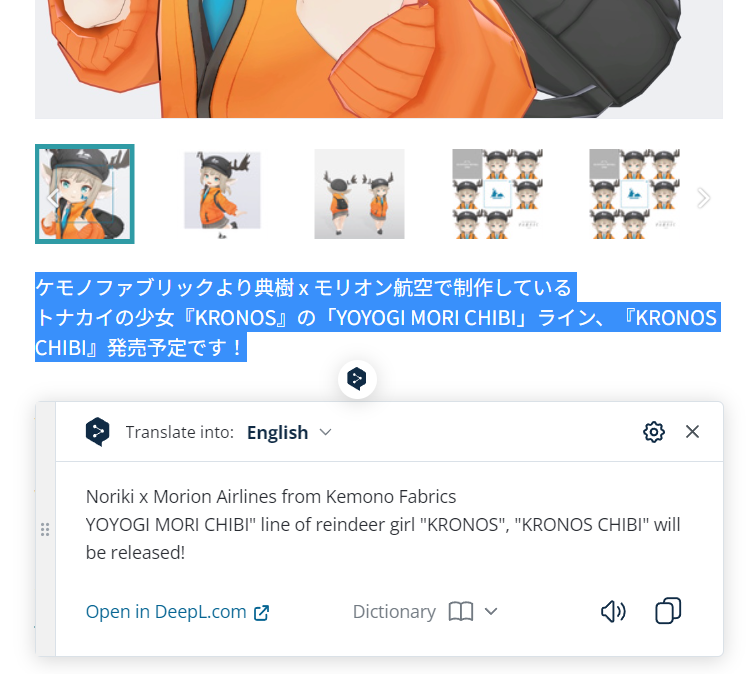
A major downside to DeepL would be that at moments it is to enthusiastic with trying to grasp the context. This sometimes cause it to leave out sentences with crucial information. Another issue is that it relies heavily on punctuation, but this is not always adhered to in casual Japanese writing. And probably due to this, it also has a hard time dealing with special characters. I highly recommend to exclude (sanitize) any special characters like emoji and musical notes from the translation input. And also make sure that when sentences are broken up without punctuation, that it might be a good idea to add punctuation or translate lines of text induvidually.DeepL translation can go wrong with special characters.[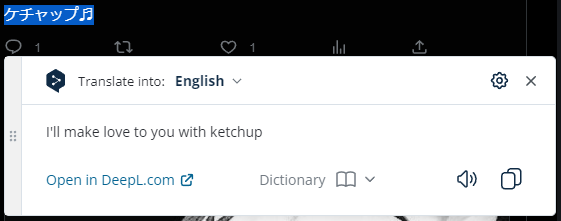](https://vrclibrary.com/wiki/uploads/images/gallery/2023-04/deepl-error.PNG)
Always be weary of the accuracy of the translation and when in doubt use an alternative translation tool and/or ask for help from someone that has a firm understanding of the Japanese language. Luckily most requirements tend to be mentioned with their official English name. Things like the name of the shader or a specific script like Dynamic Bones. If shaders and/or scripts are not mentioned then there is a chance they are not needed or are included with the package.Here an example of well defined and correctly listed requirements.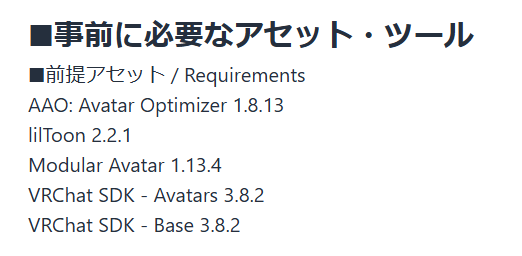
## Licensing/Legal \*\*\*this section is nominated for a rewrite\*\*\* It’s very likely there will also be instructions regarding how you may use the avatar. A lot of creators do not want their avatar to be used in a certain commercial setting. And you can be quite sure that it is not allowed to redistribute the avatar. If you're looking for an avatar form a Japanese creator that you can distribute on your own behalf then I recommend to read more about that in the section "Cultural barrier". If you still want to use it for a commercial setting then I highly recommend to get in contact with someone that can read/write Japanese very well and have them contact the creator on your behalf. Many avatar creators also have limitations in what context you can use the avatar, examples like: for political, religious and/or sexual situations are usually not allowed. Or the creator expects you to use common sense. The contents of the license might sound silly to you, but I still highly recommend to comply with it. The copyright issue in Japan is a hot potato, and sadly many people in Japan do not enjoy the same protection from the law as a lot of western users do. Failing to comply with a license may result in a host of issues that are beyond the scope of this manual. ## Cultural barrier And that brings us to the cultural barrier. Over my time in VRChat for the past 5 years, I have spoken with several users that contacted creators on booth.pm with requests and commissions. A lot of times the interactions are described as alien from both the customer perspective as well as the avatar creator perspective. (still requesting more information and examples for this) What I have seen so far is that quite a few of the populair avatar creators are professional model creators, they make VRChat avatars for fun to practice their craft and/or earn a bit of money on the side. When they are approached for a commission then this usually takes place inside VRChat and/or they are introduced to the client by someone they know. The official communication for the project then usually takes place in private on Twitter messages, booth messages, e-mail or on discord. Depending on the users wishes, a expected price point will be decided. This is calculated based on key factors like "Is good concept art available?", "time scheduling" and "difficulty of the project". Requests like "Make a replica of a certain copyrighted character (without the rights)", "requests to make something way below the bar of what the creator is capable to do" or "I don't have any concept art, but it must look cool" will usually get instantly rejected. It is also very possible that the creator for it's real job actually works on a project that is related to what you're requesting, In those situations the creator might decide that based on "conflict of intrest" it will not accept the job. Some customers are also really surprised about the large price tags that Japanese creators put on their work. From scratch projects that are provided with original concept art can easily go up from 1500 to 3500 USD. (citation needed) Japanese creators also have a dilemmas that they heavily worry about a lot. Things like: - If the customer can't communicate in Japanese, can I then understand and intrepid the wishes of the customer correctly? - Will the customer understand my standpoints when we encounter a problem in the project? - This avatar concept is a design nightmare, will the customer get angry if I point that out? In these situations Japanese people tend to avoid confrontation. Even though the offer might be financially attractive, in the end they tend to refuse the request when they realise they have to deal with these issues. [Sheru’s booth.pm avatar guide](https://vrclibrary.com/wiki/books/sherus-boothpm-avatar-guide) © 2023 by [sheru](https://x.com/MeishiFutsuu) is licensed under [CC BY 4.0](https://creativecommons.org/licenses/by/4.0/) # What you need to know about Zip files Deciphering the store page might not provide all the necessary information. The next logical step would be to look for a readme file in the downloaded zip file, but this is where we potentially encounter our first serious roadblock. This is usually the first point that people are starting to get really confused about their purchase. ## Code page shenanigans As some will know, the written language in most Asian countries is completely different from western countries. To make this work on a computer it will need a different underlying code page to deal with all the extra characters. This means that if your computer is not set up for the correct code page, it might not display everything correctly. This explanation is oversimplified, if you want to get more in to the technical aspect of this then please look this up [here](https://learn.microsoft.com/en-us/windows/win32/intl/character-sets-used-in-file-names "Character Sets Used in File Names"). If you open a zip file that contains Japanese text, there is a pretty big chance that it will look like a pile of garbled unreadable characters. Some folders and files might also be missing. This does not mean that the zip file is broken, it simply uses the wrong code page to display the content of the zip file.Example of a wrong code page[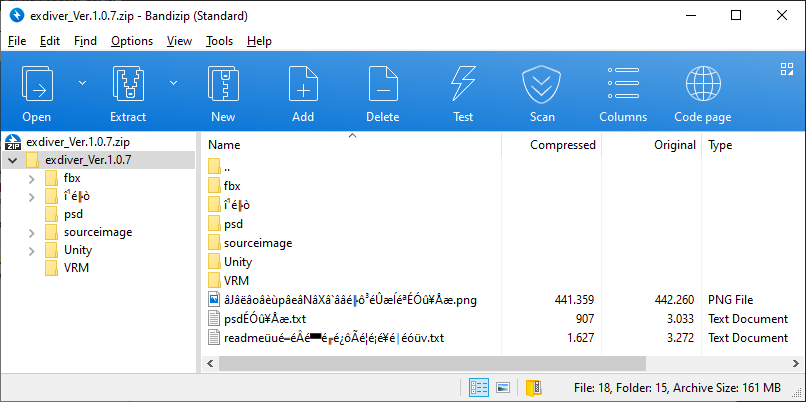](https://vrclibrary.com/wiki/uploads/images/gallery/2023-04/Wacsheru-bad-example.png)
But a lot of people will think "oh, can't read the contents, but the files are fine right?" and continue extracting the zip file and start using them in Unity. Well, this is the point where it can go seriously wrong. I don't understand the exact science behind it, but I have seen cases where this codepage issue keeps following you even inside unity package files. There are many ways to get around this, but IMHO the easiest way to solve this with the least amount of intrusion is to have a zip file manager that allows you to change the code page. For this I personally recommend the free to use program Bandizip. You can download it for free here : [https://www.bandisoft.com/bandizip/](https://www.bandisoft.com/bandizip/) When you open a zip file with Bandizip you can easily change the code page with the "Code page" button at the top right to the correct code page. After that you can extract the contents as intended. For people that use [Winrar](https://www.win-rar.com/ "WinRAR") version 5.4 or higher, you can use the keyboard shortcut `Ctrl + E` and select the correct language. For people that use [7-Zip](https://www.7-zip.org/ "7-Zip"). Eeeh yeah.. I'm sorry, although 7-Zip can handle these files, it does require a command console to make it work. Documentation about this is sparse, so I can't really provide a simple solution for it. In case you're wondering, you will need command `-mcp 932` (932 stands for Japanese). This is not something I would personally recommend for beginners. From personal experience I can confirm that most other zip file managers do not have a user friendly built-in option for this.Warning! If you extract the contents of a zip file with the wrong code page and you import these files into Unity, the avatar might not function correctly and/or generate errors when trying to upload. Errors can appear that indicate files/textures are missing and/or parts of your avatar are not displaying correctly. It is also possible that the avatar is showing incorrect stats that do not comply with what is advertised on the booth store page. Before you ask for help in these situations, please make sure you extracted your zip file correctly!
## Unexpected files There is currently no universal standard on how to distribute an avatar for VRChat. I have seen projects come in all sizes and shapes. What I consider the gold standard is a zip file that contains several folders that are containing things like textures, PSD, FBX/Blender/VRM files, usually in the root a readme file or a URL to instructions and a unity package file.A good example of a zip file[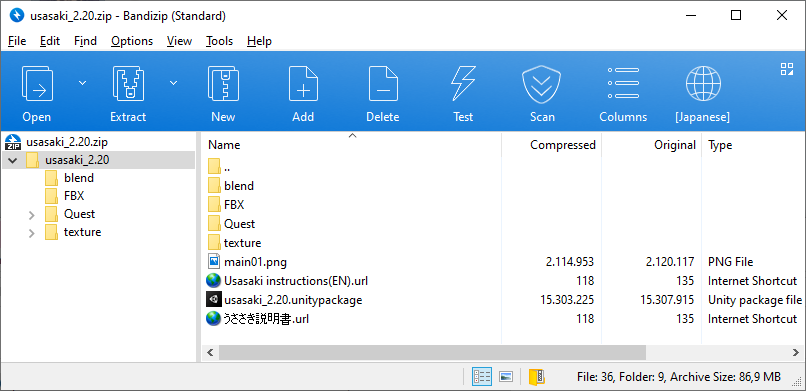](https://vrclibrary.com/wiki/uploads/images/gallery/2023-04/sheru-good-example.png)
This is however not always the case. It is possible that only a unitypackage is provided with no extra information or files. This is not really the ideal situation, especially the lack of resources to modify textures and mesh files can be disappointing. And without a readme file you will need to look up the booth website every time you forgot what shader to use since a readme file will usually tell you what shader you need. But before you get too disappointed, make sure to check the content of the unitypackage file. It is possible that additional files like blender/FBX and PSD files are included in there. If they are included with the unitypackage file then you will be able to find these files in the project folder after you imported them to your Unity project. This can potentially bloat the size of your project folder, but for some creators this workflow makes sense to have the files there. These extra files will in general not affect the size of the avatar when uploaded to VRChat. [Sheru’s booth.pm avatar guide](https://vrclibrary.com/wiki/books/sherus-boothpm-avatar-guide) © 2023 by [sheru](https://x.com/MeishiFutsuu) is licensed under [CC BY 4.0](https://creativecommons.org/licenses/by/4.0/) # Actually uploading an avatarThis part is being worked on.
## VRC Creator Companion Although it's possible to maintain projects manually with only having Unity installed (and until VCC was introduced, this was the norm), I do highly recommend to use the VRC Creator Companion or VCC for short. These days most shader and tool creators have all their projects compatible with VCC, and keeping track of if you have updated these yes or no is trivially easy when using VCC.When you manage a project, it clearly informs you about new versions. 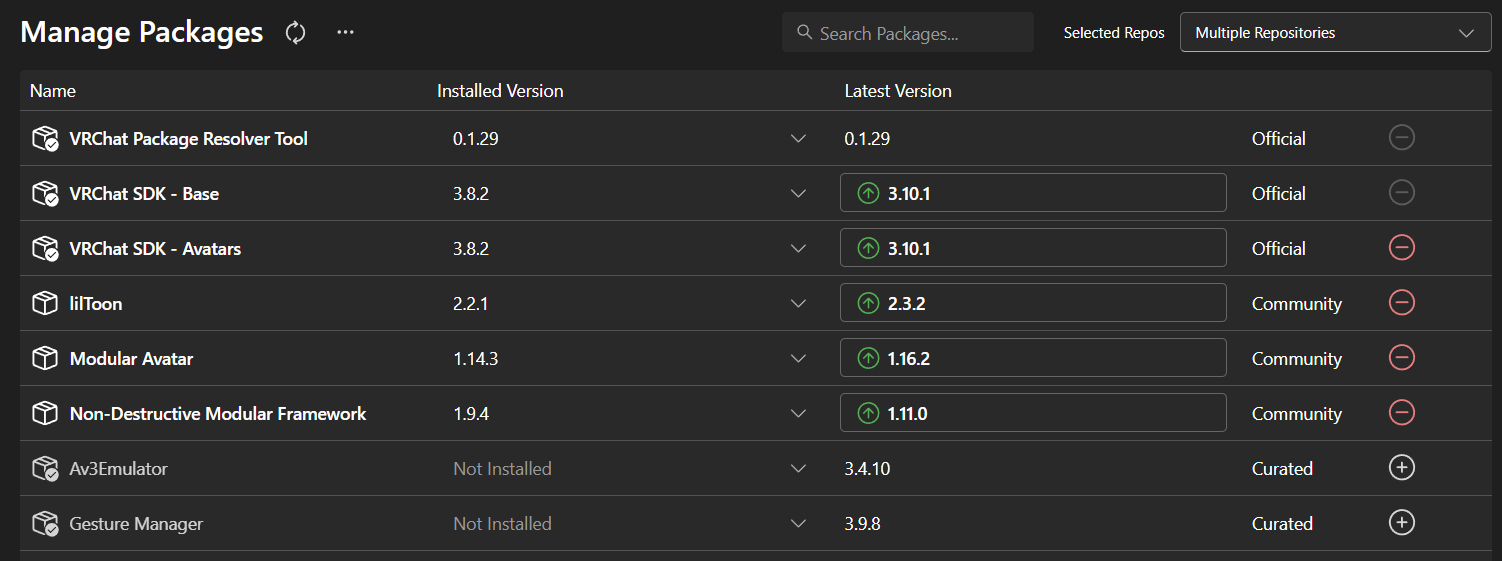
Also during the installation VCC will guide you directly towards what version of Unity you need and will warn you when things are not in order. #### Unity version The current Unity build used in VRChat can change over time, at the time of writing the version is [2022.3.22f1](https://unity.com/releases/editor/whats-new/2022.3.22 "Unity 2022.3.22f1"). But if you want to be absolutely sure about the latest version in use then please check the [creators.vrchat.com](https://creators.vrchat.com/sdk/upgrade/current-unity-version/ "Current Unity Version") website. Some older avatars on booth might still use version 2019.4.31f1, VCC allows you to create a project based on this version. (it does require you to install this version of Unity as well) But it is recommended to upgrade your project to the latest version. Information about upgrading to 2022 can be found [here](https://creators.vrchat.com/sdk/upgrade/unity-2022/ "Upgrading Projects to 2022"). #### SDK version SDK is usually very straightforward, most creators will mention they use SDK3 or say their project is VRChat compatible. This is the same or newer version that VCC will install per default. Please be aware that SDK2 is considered obsolete and will no longer be maintained for features and is officially by VRChat referred to as a [Legacy SDK](https://vcc.docs.vrchat.com/legacy-sdk/ "Legacy SDK"). This also means SDK2 can no longer be downloaded from the VRChat website. Keep in mind that SDK2 on top of being obsolete it is now in the status of being deprecated. You can read all about that [here](https://ask.vrchat.com/t/developer-update-16-january-2025/39210#p-73144-sdk2-new-upload-deprecation-7 "SDK2 New Upload Deprecation"). If you are new to uploading VRChat avatars then I would highly recommend to avoid acquiring avatars that list SDK2 as a requirement. #### Shaders Shaders can usually be found on booth.pm or [GitHub](https://github.com/). If you can’t find the shader because the website/project no longer exists then always double check if the shader is included with the package. Google can also be a great help to find a specific shader. Common shaders that are used these days for avatars are the [lilToon shader](https://lilxyzw.github.io/lilToon/ "lilToon shader") and [poiyomi shader](https://www.poiyomi.com/ "poiyomi shaders"). Less common used shaders these days are UnityChan Toonshader2.0, Jewelry Shader and ArkToon shaders. ArkToon and Jewelry Shader have kicked the bucket in favor of lilToon, most projects that used these old shaders have upgraded their project to use liltoon. If this is not the case then you would need to manually change this. There are also a few exceptions to this, some creators decided to include their own custom shaders to add features they need and/or avoid explaining to their customers what shader they actually need. For example yoyogi mori, although they recently also joined the lilToon bandwagon. They do provide a special tool (lil YM extension) to enable certain specific Yoyogi Mori features with lilToon. #### Modular Avatar Modular Avatar is a popular feature that has been introduced back in 2023 and can be found on many items and avatars. This system allows you to simply add items to your avatars by drag and drop them in Unity on to your avatar. This can be easily added to your project If you have VCC installed. Download and documentation can be found [here](https://modular-avatar.nadena.dev/ "Modular Avatar documentation") in both Japanese and English. #### Dynamic bones Dynamic bones is a separate package from the [unity store website](https://assetstore.unity.com/packages/tools/animation/dynamic-bone-16743). You can buy this for +/- 20 dollars. If you are stuck on a budget then it's worth waiting and keeping an eye on it as it often goes on sale with a neat 50% discount. Once you own dynamic bones, you can apply it to any unity project you want. Including your own projects when you perhaps make your own avatar in the future. There are also plenty of guides on YouTube that will help you add dynamic bones to avatars that don’t use Dynamic Bones. **NOTICE!!!** Please be aware that [PhysBones has been released](https://creators.vrchat.com/avatars/avatar-dynamics/physbones/ "PhysBones"), this feature is provided by VRChat for free and is included with the current version of SDK3. This feature replaces Dynamic Bones! The sole reason you would still need Dynamic Bones is when you want to import an old avatar with Dynamic Bones and convert them to Physic Bones. This conversion can't be done without the Dynamic Bones package.List of obsolete shaders [UnityChanToonShader](https://unity-chan.com/), [ArkToonShader](https://github.com/synqark/Arktoon-Shaders), [JewelryShader](https://noriben.booth.pm/items/1125691)
[Sheru’s booth.pm avatar guide](https://vrclibrary.com/wiki/books/sherus-boothpm-avatar-guide) © 2023 by [sheru](https://x.com/MeishiFutsuu) is licensed under [CC BY 4.0](https://creativecommons.org/licenses/by/4.0/) # Sources Sources used BOOTH 3D Model Category Transaction results released in 2026 [https://inside.pixiv.blog/2026/02/06/110000](https://inside.pixiv.blog/2026/02/06/110000) BOOTH 3D Model Category Transaction results released in 2025 [https://inside.pixiv.blog/2025/02/19/114500](https://inside.pixiv.blog/2025/02/19/114500) BOOTH 3D Model Category Transaction results released in 2024 [https://inside.pixiv.blog/2024/01/31/120000](https://inside.pixiv.blog/2024/01/31/120000) BOOTH 3D Model Category Transaction results released in 2023 [https://inside.pixiv.blog/2023/01/31/120000](https://inside.pixiv.blog/2023/01/31/120000)