Guide to MMD Dance World Full Support Logic
When people made or custom own avatar, I would assume they try and see how it is at MMD dance world which is good way to confirm most of modelling is without issue as movement be non-intentional way.
In the case, if you just enjoy MMD world, you want your avatar’s face gesture and mouth synced to world setting?
Yes, you can do that also with Avatar 3.0.
All process carried automatically so you don’t need to add expression menu item to toggle it.
(*Only some world supports All feature, most are only support part.)
This guide explains what you need to done for people with general knowledge of Avatar 3.0 and tell you what to do.
Please note: When you read these documents, I assume it is at least custom animation is under working state which means your avatar do dancing when start animation at MMD dance world. If it not works at all, you may have unusual blendshape name which needed to match VRChat standard to make it animate.
To Start
*Due to multi reginal support, latest version uploaded to booth (https://slord.booth.pm/items/3341221 ) at first place but I shall try to update here next to.
When people made or custom own avatar, I would assume they try and see how it is at MMD dance world which is good way to confirm most of modelling is without issue as movement be non-intentional way.
In the case, if you just enjoy MMD world, you want your avatar’s face gesture and mouth synced to world setting?
Yes, you can do that also with Avatar 3.0.
All process carried automatically so you don’t need to add expression menu item to toggle it.
(*Only some world supports All feature, most are only support part.)
This guide explains what you need to done for people with general knowledge of Avatar 3.0 and tell you what to do.
Please note: When you read these documents, I assume it is at least custom animation is under working state which means your avatar do dancing when start animation at MMD dance world. If it not works at all, you may have unusual blendshape name which needed to match VRChat standard to make it animate.
自分でアバターを作った時、モデリングの問題の確認などでよく使われるMMDダンスワールド。
なんでしたら暇な時の時間つぶしやフレンドと踊るなどもよくあることですね。
そういう時に思うのが、表情や口もワールドに設定されている通りに動いてほしい!
このガイドではそんな方々に向け、Avatar 3.0がある程度わかっている人向けに何をどう触ればいいのかを解説しています。
なお、基本的に自動的に推移する方式なのでExpression Menuなどの追加は必要ではありません。
(*一部のMMDダンスワールドのみ両方をサポートします。片方だけという場合も多いです。)
注意:本記事はアバターがダンスを既にするのを前提にしています。しない場合はblendshape名などをご確認ください。
*Please note that any state to be used at that time be without motion attached may cause issue. *
*You can put empty animation to slot and avoid this issue if state not has motion. *
*MMD時に利用される全てのStateはMotionが空だとエラーする可能性があります。*
*空アニメーションでも問題ないので何かを入れてください。*
Base Layer
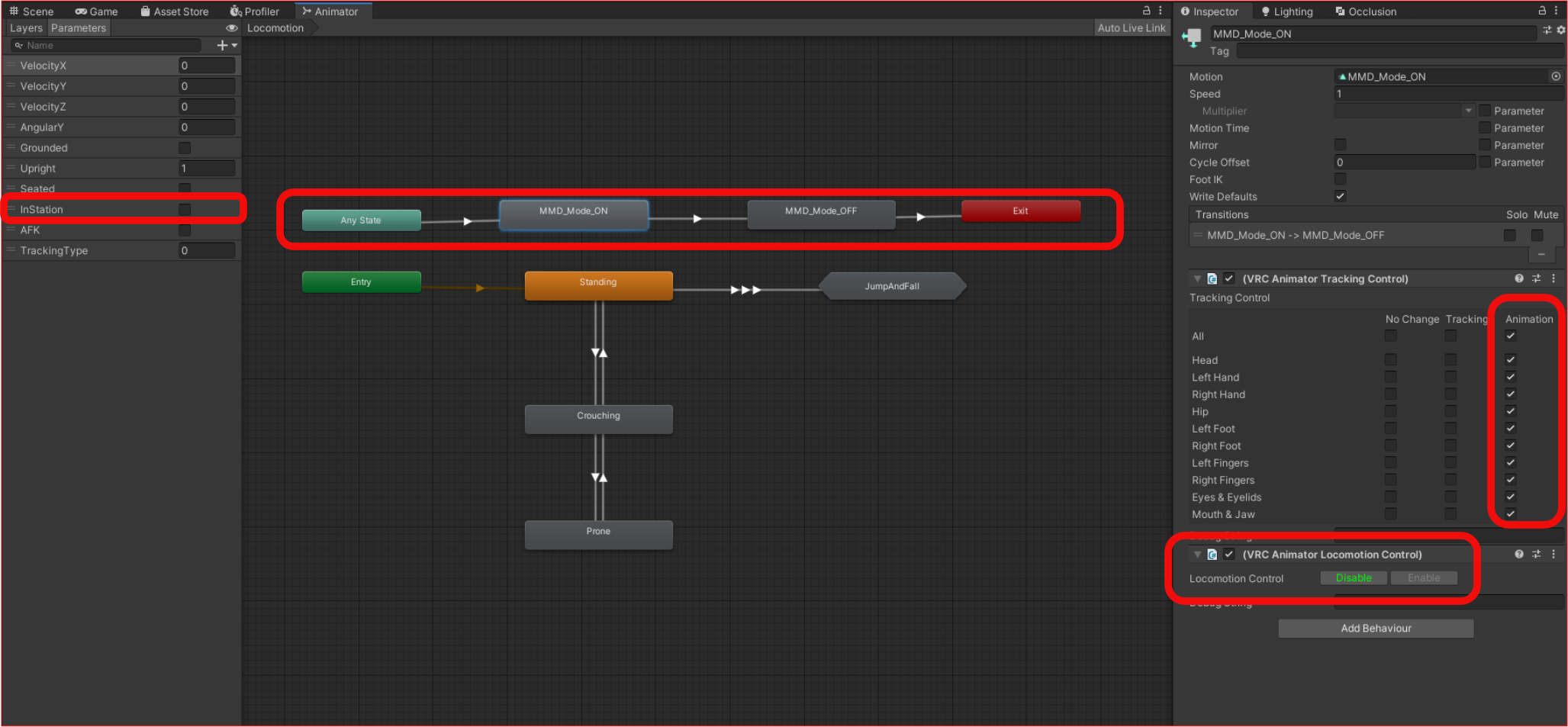
On the base layer, you need to do following,
- Make “InStation” bool, this will be used to detect you are while dancing or not.
- Make Any to State1 (Enable MMD mode by InStation bool true) and State2 (Disable MMD mode by InStation bool false) to put everything back before Exit.
- On State1, you need to force VRC Animator Tracking Control to Full Animation this will make sure your avatar moves without tracking your input.
- On State1, you also need to disable Locomotion, this is to prevent some fault input.
- On State2, you need to put it back as it is before. (Settings depends on your favour, find your best with debug menu.)
*As empty motion cause issue, please put empty animation on State1 and default animation or empty animation on state2.
Base Layerでする必要があること
- “InStation” というboolを作成します。このboolでダンス中かを判断します。
- Anyからステート1(MMDダンスモードON、InStation bool True) 、ステート2(MMDダンスモードOFF、InStation bool False) 、Exitの構成を作ります。
- ステート1でVRC Animator Tracking ControlをAnimationでオーバーライドします。(これでユーザーの入力操作を無効化します。)
- 同じくステート1でLocomotion ControlをDisableします。これは不慮の操作を防止するために行います。
- ステート2には上記2つの操作を戻す設定を入れます。(ユーザーごとの好みを見つけてください。Debug Meuを活用すると早いかも?)
*Motion欄が空白だとバグが発生する可能性があるのでステート1には空アニメーションをいれてください。またステート2には元のアニメーションか空アニメーションをいれてください。
FX Layer
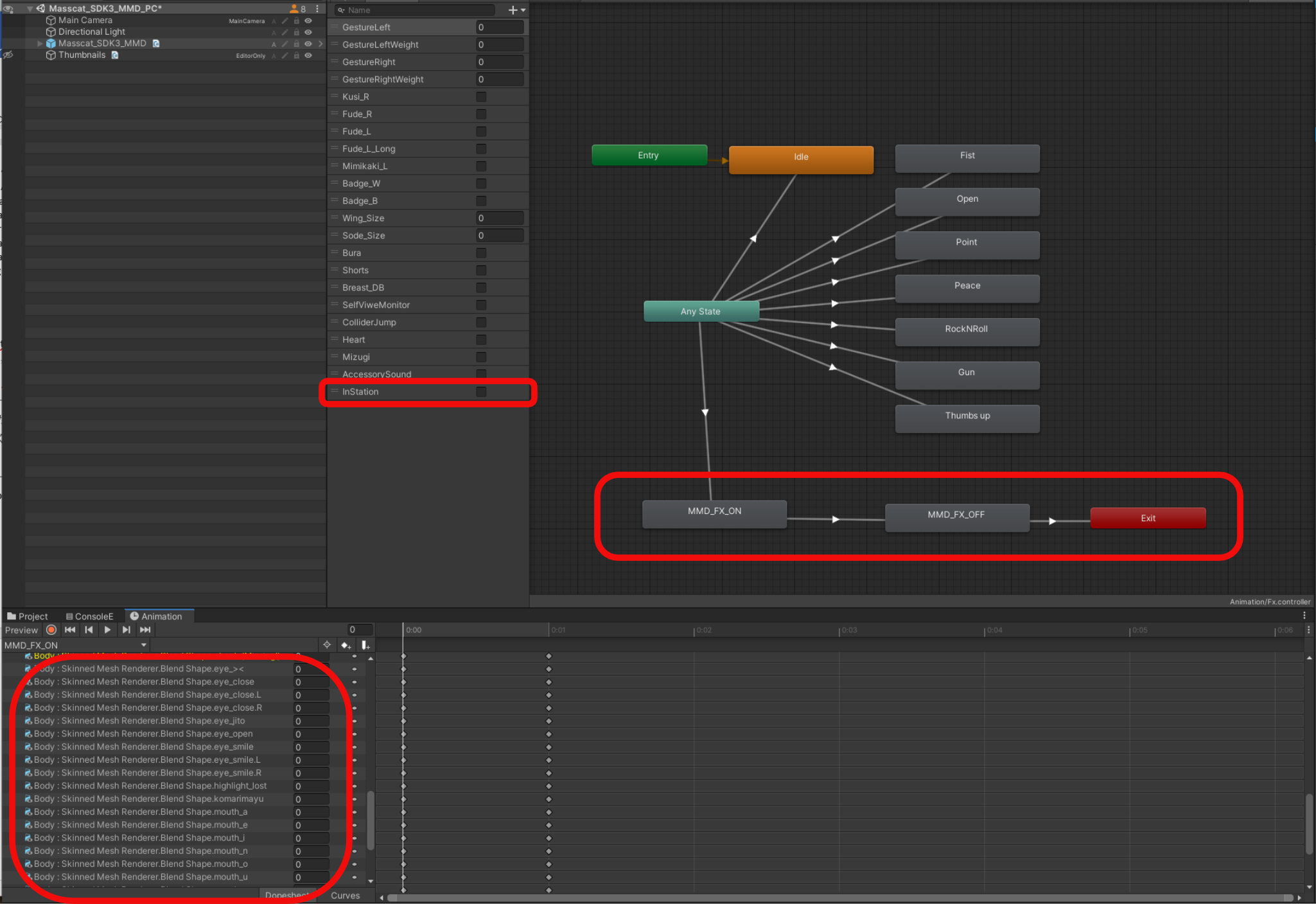
On FX layer, you need to do followings,
- You need to make “InStation” bool again.
- Make some kind of transition which makes you override blendshape to all 0 to make your face animated.
(Without making all of blendshape to 0, Face Gesture may not work as MMD world made based on 0.)
FX layer transition depends on avatar and how you configure animator.
But you need to do something to make all blendshape to 0 while InStation bool True while you need to turn back to original if it done. In my case, I add InStation False to all available transition from Any and make only MMD Mode InStation True then finish by Exit. (Don’t forget to reset blendshape before Exit, your Face Gesture may not work if transition not goes well. This part is needed if you are using custom blendshape as default to prevent face blendshape become incorrect when exit.)
FXレイヤーでする必要があること
- まず”InStation” boolを作成します。
- ここからはアバターやAnimatorの構成により異なりますが、Blendshapeを全部0にするアニメーションを組みます。(0以外の場合うまく動作しません。)
私の例で行くと、既存の全ての推移にはInStation Falseを追加しています。そしてAnyからInStation TrueをMMDモードのみに割り当てて、終われば戻してExitさせている形になります。
(Exitさせる前に既存のBlendshapeに戻すアニメーションを入れることをおすすめします。既定の表情がblendshape 0 以外の場合はその設定に戻す設定を入れてください。既定の表情にうまく戻らないのを抑止します。MMDワールドは初期値0を想定で製作されているので動きません。)
Where you can try full animations?
iY MMD World 1․1a — by Iris Alias
https://vrchat.com/home/world/wrld_7d2af18c-e4a1-4084-9cd2-b27432b45980
MMD Dance Stage 0․2B — by Eve
https://vrchat.com/home/world/wrld_4d9d8595-dd4e-4f4a-88f9-2a0e745b38d5
MMD World (Dance) — by Folon【フォロン 】 *Limited/一部のみ
https://vrchat.com/home/world/wrld_87e04d9b-8123-4835-b5b5-ca7b22244ee6
MMD Dance World — by Aeriiie *Limited/一部のみ
https://vrchat.com/home/world/wrld_776a6a37-f307-43f4-aeef-8f151f38dba4
The Sandbox Dance Lounge — by Splinks *WIP/製作途上
https://vrchat.com/home/world/wrld_aea5c1d3-7abc-4287-acf8-200279c12700
=Not supported so need to change face blendshape manually=
=対応していないので自分で表情を切り替えるワールド =
MMD Dance Studio — by Shiftle
https://vrchat.com/home/world/wrld_66cc6289-1968-4d56-9f9f-5f8cd77bb192
MMD Dance World — by ․МуРзиК․
https://vrchat.com/home/world/wrld_c3386be2-56c3-4123-bcf6-3119c3cffe7a
Reference
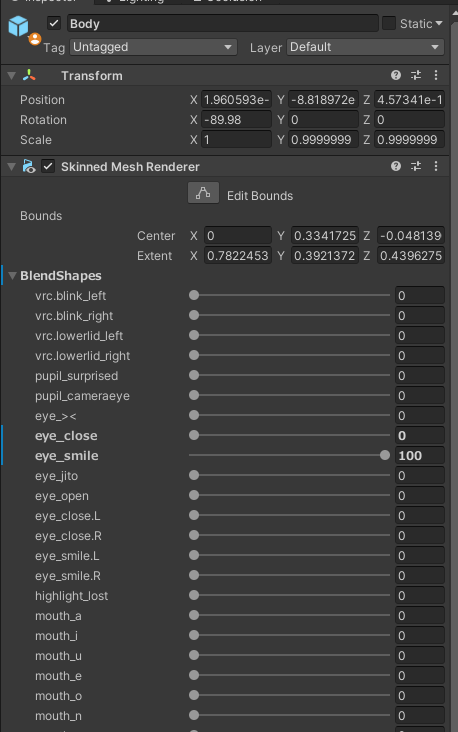
(Sample Picture)
GameObject contain Face mesh required to be named as “Body” on FBX level.
In some case, edit name on unity not works on all the worlds, I personally recommend change name on blender instead while working to add blendshape name too.
顔のメッシュが入っているGameObjectの名前はFBXの段階でBodyである必要があります。(FBXレベルで直さないと動かないことがあります。)
一部ワールドにおいて、Unity上だけでの編集だと動かないのを確認しております、個人的にはblendshape名の追加と併せて、GameObject名の変更もBlender上ですることをおすすめします。
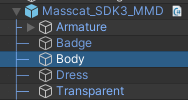
(Sample Picture)
“Body” GameObject required to located just below root of avatar, it cannot be somewhere else.
BodyのGameObjectはアバターの最上位階層のすぐ下にある必要があります。
Face mesh required to have VRChat default and JP MMD Morph Blendshape name at least.
Please find attached link below to find Japanese and English MMD Morph Name.
顔メッシュのBlendshape名にVRChat標準のBlendshape名に加えて特定のMMD用モーフ名が必要になります。以下のリンクを参考にFBXへ追加してみてください。
*Japanese Version MMD Morph / 日本語版MMDモーフ名* (内容は二つとも同じ)
https://docs.google.com/spreadsheets/d/1UtOJhJr45gahf2epvQlDxC1AXcJw_hepn1t0HY1mlGI/edit?usp=sharing (Written in English)
https://docs.google.com/spreadsheets/d/1DnkY4-nKIOJzpk1CPynX5_3_fznUQ-XdpVZm9mmt68o/edit#gid=0 (日本語で記載)
*English Version MMD Morph / 英語版MMDモーフ名* (Optional)
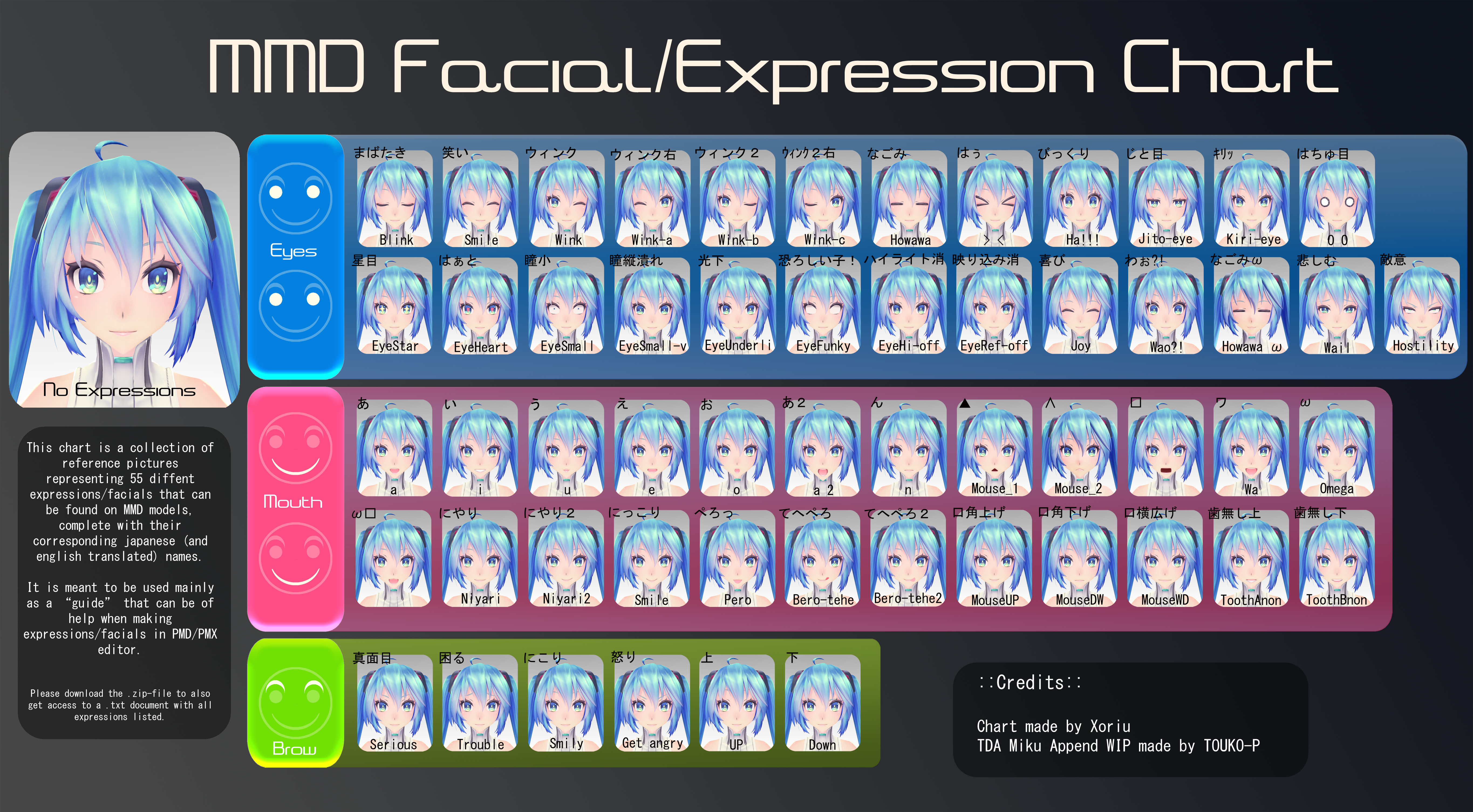
*According to our internal research, only limited number of worlds support English blendshape, as result, English morph is optional. Also, mouth may not work.
*最新の調査によるとほぼ英語モーフは使われているワールドがありませんのでイプション仕様。また口が動かない模様。
*In some case, JP/EN blendshape name conflict each other, to prevent this, add toggle bool to make animation -100% of others to make it use only JP or EN at the time. This method prevent issue such as 200% value of blendshape.
*一部のワールドには日英両方のモーフが設定されている場合があります。こういう時用にJP/ENを切り替えて使えるようにboolを作る事をおすすめします。
表情が200%に現象を抑止します。
(使わない方を-100%するアニメーションを組みます。)
**In Any Cases, If you changed GameObject name or Blendshape name, you are more likely need to re-make all of animation on your avatar, please backup and do your job.
I’ll reference tools to setup animation basic.
***ほとんどの場合、GameObject名やBlendshape名を変更した場合はアニメーションの再設定が必要になります。必ずバックアップを取ってから作業してください。
以下にアニメーションの再設定に便利なツールを記載させていただきます。
*https://booth.pm/en/items/1258744 (VRCAvatar Editor by Gatosyocora)
*https://booth.pm/en/items/2219616 (Combo GestureExpressions by Hai)
=Debug Blendshape=
If you just want to debug that blendshape is working while gesture not works, remove all “Playable Layers” and upload to VRChat. You cannot use gesture but can check model part be fine.
=シェープキー設定のデバグ=
モデルのシェープキー設定が正しいかを確認するだけであれば全ての”Playable Layer”を外せばGestureなども効かなくなりますが確認できます。デバグにご活用ください。
=MMD FX END=
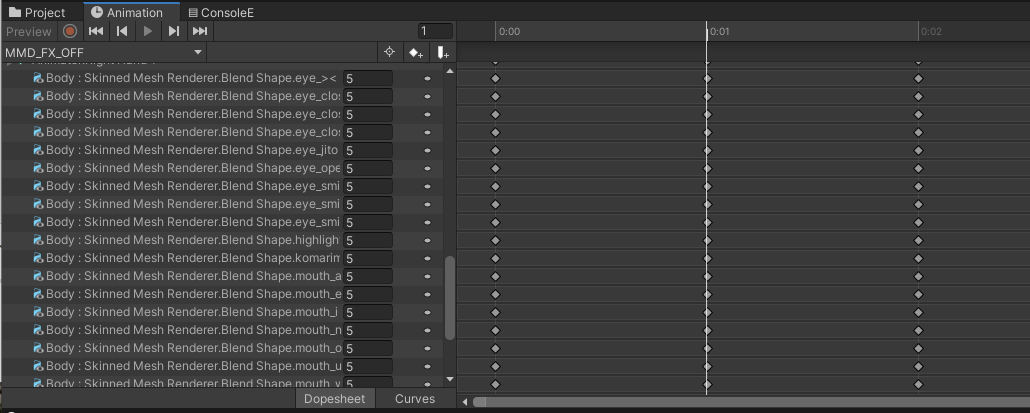
When MMD animation done (or respawn in middle), there is bug on some worlds that blendshape not reset properly, as result your avatar not animate from 2nd songs onwards. To resolve this situation, put small value to override all blendshape (smaller value will not have visible difference so will prevent falsie face, prefer to be value not used by your default blendshape) then reset to your default face value.
MMDアニメーションが終わった際や途中でRespawnした際に、一部のワールドにおいてBlendshapeが正常にリセットされない事象を確認しております。
この対策として、一端全てのBlendshapeに小さい数字を入れてから既定の表情にするアニメーションを入れることで解消出来ます。(小さい数字だと一瞬変顔になっても気づかないため。既定の表情に使っていない数字を推奨。)
Credit
If you find any issue with this document,
Feel free to let me know by followings,
この書面に問題を見つけた際は以下までご連絡ください。
(Continue to next page, 次のページへ続く)
=Documents Maintainer Info / 本文章管理担当=
Twitter: @slord399
Discord: https://discord.gg/B6SRMag (Tony_Lewis#1234)
(English is fine. 日本語でも大丈夫ですよ。)
=================================================================
This method originally discovered by Yunity (@hsgwuni) who help me a lot on making this documentation. Thank you for your big support.
この方法を最初に見つけてくださって文書化するのに多大なご協力を
頂いたゆにてぃ (@hsgwuni) さん、陽子狐(@WeeSunnyFox)さん、colloid(@C_Colloid)さん、Mimmy(@mimyquality)に最大限の感謝を捧げます。