Accessibility in VRChat Worlds
VR allows for creators to build anything they imagine for others to experience. While this is great considerations should be taken to make the world accessible to all where possible. The goal is to increase awareness of the various disabilities people may have in VR.
This is, in its initial form, based on my individual experiences. I am a Epileptic (no seizures luckily) with VERY strong astigmatism and retina damage. This makes living and experiencing VR more difficult than the average person. I am pushing for more awareness of people with visual issues like myself. This document may be incomplete or incorrect and is based on my current understanding.
Please suggest any changes or additional disabilities to add to this book.
- Visual Accessibility
- Audio Accessibility
- Physical Accessibility
- Related Canny Posts
- Additional Resources
Visual Accessibility
While the world may look great to you, not everyone has your eyes and equipment. Each person experiences the world differently. Providing customization options is essential for player comfort in allowing them to customize the world for their optimal experience, even if their optimal experience doesn't match the original experience of the world.
VR Hardware
Customization options allow people with different VR hardware to adjust the experience for their headset. Each VR headset model has a different color accuracy and black level. On Index and other LCD based headsets the world may look fine, but on OLED headsets like the Vive it may be significantly harder to find darker objects since OLED headsets have better black levels. This is especially an issue on dark maps where OLED headset users have a harder time seeing.
Astigmatism
 Image credit (Unusual Facts) on twitter.
Astigmatism is another issue many people face. Its a deformation in the eye which can cause god rays and glare from bright light sources. This is similar to Bloom and Lens flare. Known symptoms include
- Blurred or distorted vision
- Eyestrain or discomfort
- Headaches
- Difficulty with night vision
- Squinting
A large percentage of the population have mild astigmatism which doesn't bother their day to day activities while others, like myself, have more extreme flare. I myself have found increasing gamma helps reduce the flare effect. Gamma is a curve applied to color which affects how bright or dark a scene is. Increasing gamma brings the light and dark parts of the scene closer together, at the cost of a more washed out look.
Motion Sickness
Motion sickness is nausia caused by the brain rejecting the perceived motion from vision. Actions that can amplify motion sickness
- Moving the player without player interaction
- A constantly moving environment
- Losing the horizon, or the reference of where the ground is
- Distortion effects
- Low frame rate
Epilepsy

Epilepsy is abnormal activity in the brain, often triggered by visual input. Epilepsy can manifest in multiple ways
- Temporary confusion
- A staring spell
- Stiff muscles
- Uncontrollable jerking movements of the arms and legs
- Loss of consciousness or awareness
- Psychological symptoms such as fear, anxiety * deja vu
The chance of an epilectic response can be triggered in multiple ways.
- Lots of active FX including
- Audiolink
- LTCGI
- Stage FX
- God Rays
- Large video players / displays
- Flashing Lights (regardless of color, brightness, or pattern)
- Strong post processing
- Certain patterns
- Scrolling textures (ex: water)
Even if the experience of a world is build around players experiencing the FX, like a club world, Toggles should be provided for players to customize and disable certain effects to enhance their comfort. There is no one size fits all. Each person with Epilepsy has a unique trigger. For example I am sensitive to flashes and effects including UV scrolling and moving particles.
Overstimulation

overstimulation is an issue with similar triggers to epilepsy. When too much is going on visually its possible to be overwhelmed and panic. Known symptoms include
- feeling agitated or on edge
- thinking that you need to escape or get away from the trigger
- feelings of losing control
- feeling dizzy, lightheaded, or nauseous
- difficulty processing information
- temper tantrums
- feeling like you are in “fight-or-flight” mode
- difficulty regulating emotions
- having difficulty concentrating or focusing on anything other than the trigger
- feeling your heart racing or pounding
- sweating, trembling or shaking
- panic attacks
- shortness of breath
- headaches
- insomnia
- fatigue
- irritability
Toggles to reduce visual input can be a major help in preventing overstimulation.
Color Blindness
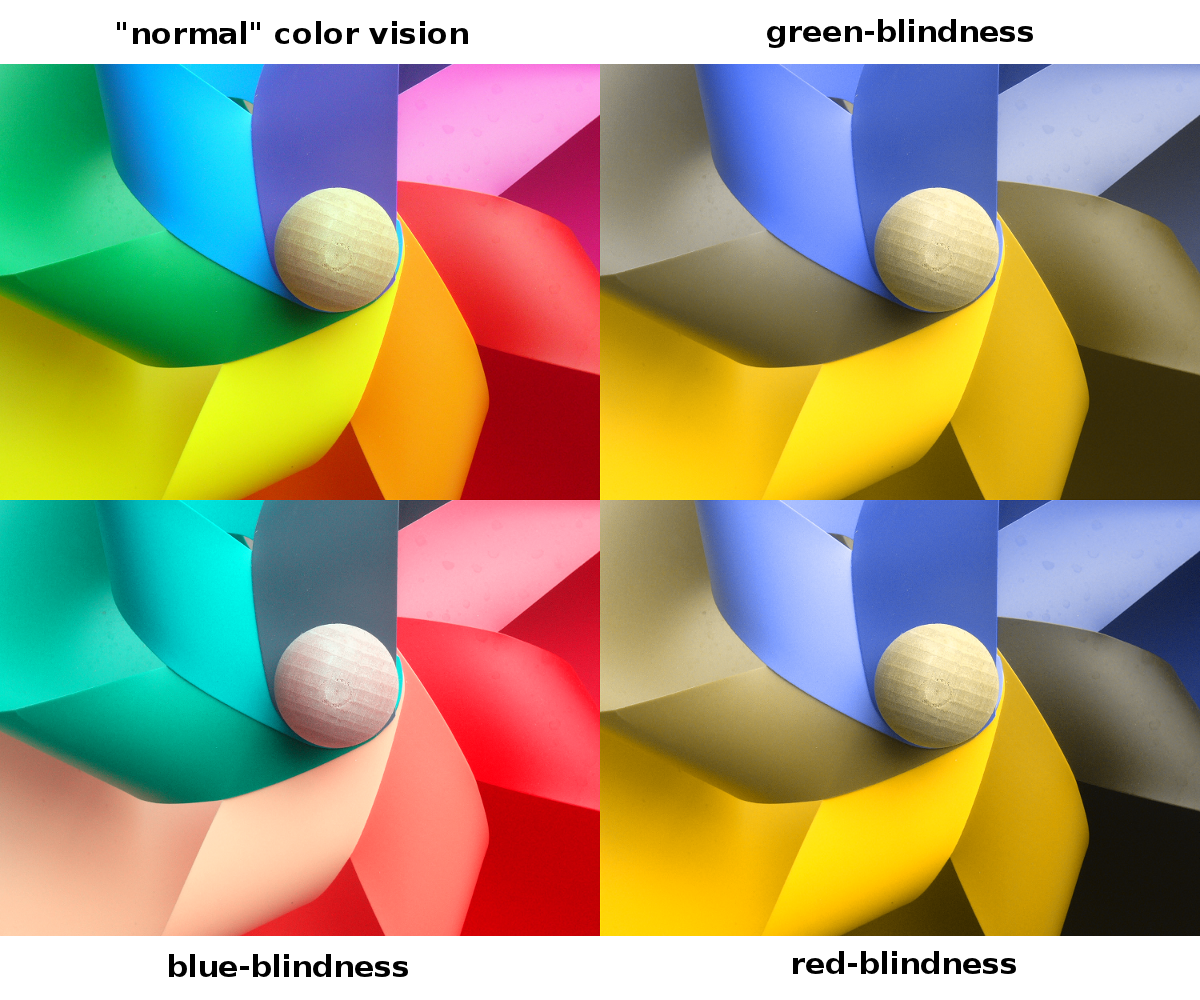
Color blindness is an eye disease which affects the perception of color. Symptoms include trouble seeing
- The difference between colors
- How bright colors are
- Different shades of colors
As a world creator you should make important objects use a strong opposing color so they stand out and avoid using gradients of the same color, where objects with similar color may appear identical.
Limited FOV
While most VR headsets have the same FOV, the lenses in the headset, and any corrective lenses the user has, may limit the readable FOV. This can make HUD ui elements impossible to see. For my headset and perscription inserts I can only read clearly in a ~30 degree fov circle from the center of the display. Near the edges, where fixed UI elements like notifications and the mute icon are, its a blurry glow which I cannot make out any details or read any text.
Creating UI which lets you look around the edges, before moving to stay in view, is a great solution. For example, at the time of writing, Project Aincrad handles this by making the UI fixed when moving, but when you are standing still you can look around with the HUD staying in place.
Language Barrier
Sometimes the player just cant read the language the world was built around. Icons should accompany text buttons that indicate the action the button will do. Optionally language buttons could exist in the world which localize the text in the world.
Audio Accessibility
Each person hears hears differently, some with larger differences than others.
Deafness
Deafness is ruduced or loss of hearing. Common symptoms include
- Difficulty hearing or understanding words
- Hearing muffled sound or speech
- Listening at a higher than usual volume
Visual cues should accompany audio cues in the world.
Single ear Deafness: Symptoms of loss of hearing may appear in a single ear, Audio cues should be played in both ears.
Loss of hearing specific frequencies: Sometimes hearing loss takes form in a reduction of perceived frequencys, usually at higher frequencies. Audio cues should span a wide frequency range to reduce the chance of the cue being unheard by the player.
Easily Startled
Some people are easily startled by sudden sharp noises. A Warning in the spawn of the world should be provided. Even if the intent of the sudden sound is to startle the player.
Language Barrier
Audio with words that must be heard by the player should be acompanied by subtitles.
Physical Accessibility
While VR allows for increased interaction in a world, some people have decreased ability to move. Somethimes due to space limitations, hardware limitations, or physical limitations.
Space Limitations: Sometimes the player is stuck in seated or standing play due to lack of space to move around. Sometimes they may have short ceilings or not enough room to extend both arms in a T-pose without hitting something.
Hardware Limitations: Some VR hardware may be unable to track correctly when facing certain directions or when low to the ground.
Physical Limitations: Some players may be unable to bend or stretch in VR due to physical issues such as bad knees. Other players may only have one hand.
World creators should ensure their world can be completed with limited mobility, or inform the user of the requirements to fully interact with the world.
Related Canny Posts
A list of canny posts related to accessibility features which don't exist, are broken, or rejected with terrible reasoning.
Stop forcing requests for acessibility into a popularity contest on this feedback forum
Graphical
- [1236] Gamma Slider
- [1236] option to increase brightness past 100%
- Ability to toggle post-processing locally.
- Brightness adjust
- Disable post processing stack?
- Toggle World Post Processing Locally.
- Toggle to disable bloom and other post-process effects
- Option to disable Postprocessing clientside
- [1240] Accessibility features such as color correction's "Apply to workd" button, brightness slider, don't work on Quest
- [1238] [QUEST] Screen brightness is not affected
- disable audiolink toggle
- Video player toggle
- The "simulate colorblindness" feature is inaccurate
- photosensitivity protection
- Option to Disable Video Streams
- Allow players to disable particles and Mirrors in worlds from the menu
UI
- High Contrast theme
- [1222] [Accessibility] Reinstate High Contrast Alerts
- [1220] Avatar-hidden 'diamonds' are too transparent
- [1237] Allow hud elements to be freely moved and scaled
- [1222] Text chat doesn't follow accessibility guidelines...
- More accessibility for those that are hard of sight.
- Menu accessibility
- Ability to hide tags/worlds/authors from worlds tab
UI, Overstimulation
- [1019] Add an option to show nameplates only, no icons
- [1021] Add an option to show nameplates only, no icons
- Allow Nameplates without Icons
- Remove grow/shrink microphone HUD animation
- Option to reduce motion
- Option to disable background parallax
- Option to disable emote particles
- Toggleable emojis
Sound
- [Accessibility] Add a SFX when you receive any kind of notification
- Add "portal entered" sound when using portal via interaction
UX
- Motion smoothing option for hands. (Accessibility)
- Ability to Change Keybinds
- Accessability feature request.
- [Feature][Accessibility] Add support for one-handed calibration
- (Accessibility) Cannot calibrate full body with one controller.
- [Accessibility] Offer Optional Joystick Navigation of Menus
- [Feature Request] Add an option to make the camera bigger
- action menu accessiblity for no vr controllers
Additional Resources
Please leave a comment with anything that should be added here.
VRC Worlds
VRC Assets
External Tools
- Detection of Flashing Lights in Video Content
- AI assisted video adjustment for Photosensitive Viewers
Non VRC Papers
- Long-term outcome in children with infantile spasms treated with vigabatrin: A cohort of 180 patients
- Concern of Photosensitive Seizures Evoked by 3D Video Displays or Virtual Reality Headsets in Children: Current Perspective
- Gamma oscillations and photosensitive epilepsy
- Shedding Light on Photosensitivity, One of Epilepsy's Most Complex Conditions